

Thread: MoreCore Ruleset
-
October 21st, 2019, 19:57 #1621Moderators Immortal

Supreme Deity

- Join Date
- May 2011
- Location
- Colorado, USA
- Posts
- 34,731
Where are your pregens? Are they in a module? Or did you create them in a campaign? If in a module, you'll need to open that module and import the pregens into the character management screen from the Pregens entry in the library for that module. If in a campaign then the characters will already be in the character management screen for that campaign. Originally Posted by Ahoggya
 FG Wiki: How to Compile the FG Logs
Private Messages: My inbox is forever filling up with PMs. Please don't send me PMs unless they are actually private/personal messages. General FG questions should be asked in the forums - don't be afraid, the FG community don't bite and you're giving everyone the chance to respond and learn!
-
October 22nd, 2019, 12:30 #1622Grand Templar
- Join Date
- Dec 2018
- Location
- England, UK
- Posts
- 245
Hi all, this has probably been asked before but I am struggling to find the answer:
When you cretae new dice strings, is it best to put them in an extension or a module? I think it would be an extension but could be wrong.
Any help would be appreciated.
-
October 22nd, 2019, 14:29 #1623Publisher
Celestial Paragon
- Join Date
- Mar 2018
- Location
- Europe
- Posts
- 2,111
Extension. Modules are for content. Originally Posted by Brotherkelly
The past is a rudder to guide us, not an anchor to hold us back.
-
October 22nd, 2019, 15:36 #1624Grand Templar
- Join Date
- Dec 2018
- Location
- England, UK
- Posts
- 245
Thoughs as much. Thanks Valyar.
-
October 24th, 2019, 09:34 #1625Crusader
- Join Date
- Sep 2015
- Location
- Szekesfehervar, Hungary
- Posts
- 21
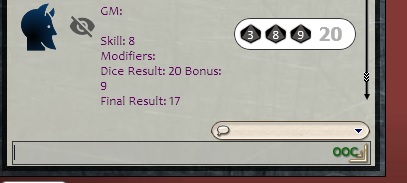
Originally Posted by pming
For example /mbook 3d10x8 seems to be working for me.
-
October 26th, 2019, 19:26 #1626Grand Templar
- Join Date
- Dec 2018
- Location
- England, UK
- Posts
- 245
I have created an extension for use with MoreCore - testing out how I can generate new dice strings and have a problem. The extension has all the right elements to it (as far as I can see) and I have put it in the Fantasy Grounds/Extensions folder on my PC. However, when I run Fantasy Grounds and create a new campaign, the extension is not listed.
I have attached the extension for anyone to check over and let me know if I am missing anything.
-
October 27th, 2019, 00:27 #1627
Brotherkelly
You ZIP the contents of the extensions folder not the folder as well.
Also make sure you use stock standard zip compression and nothing else.
-
October 27th, 2019, 00:49 #1628
pming as per the instructions Rolls are not really intended to be used from the command line. Make sure you are testing it from a Roll.
If you do want to use from teh command line you usually need to add a description after the Roll syntax.
In this case the doco is in error.
The syntax is
/mbook 2d10x#
as per rpotor
-
October 27th, 2019, 01:12 #1629
Option 1
pming do it like this:
Set up Roll called Skill Check
/rollunder 1d12x(p1)
Setup each skill (or conversely each group plus the smaller subset of skills that have been improved) with a [Name only - eg Vigor 5 and Swimming 7. These will report to chat only. Chance uses Vigor 5.
Setup some modifier rolls like this:
Easy
/mod 1
Very Easy
/mod 2
Hard
/mod -1
Very Hard
/mod -2
When Chance wants to do an Easy Climbing Check he clicks Vigor 5 (as he has no specific Climb skill) and this reports to chat Chance uses Vigor 5
He then clicks Easy and this adds a +1 modifier
He then clicks in the Skill Check p1 field and overwrites the existing number with a 5 and then clicks the roll button
Option 2
Setup each skill (or conversely each group plus the smaller subset of skills that have been improved) with a /rollunder 1d12x(p1) and add the skill level in the p1 field
Setup some modifier rolls like this:
Easy
/mod 1
Very Easy
/mod 2
Hard
/mod -1
Very Hard
/mod -2
When Chance wants to do a Hard Swimming Check he clicks Hard and this adds a 11 modifier
He then clicks Swimming and it rolls 1d12 and compares it to the p1 value -1
Option 3
Edit the rollunder skill and add some additional math
Set it to count successes as equal to the Dice Result if the Dice Result is equal to or less than the Skill + Modifier
Then when you roll Easy Swimming 7 and you roll an 8 it reports Success = 8, when you roll a 4 it only gives you 4 Successes and if you rolled a 9 you'd get none.
That shouldnt be too hard to do.
-
October 27th, 2019, 01:14 #1630Ahoggya did you resolve your questions or do you still need some help? Originally Posted by Ahoggya


 Reply With Quote


Thread Information
Users Browsing this Thread
There are currently 5 users browsing this thread. (0 members and 5 guests)
 Posting Permissions

Bookmarks