
Part 3: Combat
Order of Combat
Introduction
War has defined Roshar throughout its history. No matter where your adventures bring you, you'll need to use sword, spear, and surge to protect yourselves, your allies, and your Ideals.
When conflict breaks out that requires more resolution than just a skill test or two, it becomes a combat and follows the rules laid out here in part 3. This might be a massive battle with many combatants with various motivations, a one-on-one duel between two Alethi nobles, or even a nonviolent scene where seconds and positioning matter.
Order of Combat
In a fight, everyone acts simultaneously and every second counts. To represent this, this game divides time into a series of rounds. During each round, the PCs, enemies, and other participants each get a chance to take one turn, during which they can act in a variety of ways.
Rounds and Turns
Each round, you can choose to take a turn that's either fast or slow. Your choice grants you a certain number of actions, which represent the many things you can do on your turn (see "Gaining Actions and Reactions"):
Taking a Fast Turn. If you act fast, you take your turn first before any enemies go, but you only get two actions ([2) to use on your turn.
Taking a Slow Turn. If you instead act slow, you act after any fast enemies, but you get three actions ([3]) instead of two.
You can change your choice each round, and your decision doesn't need to be made at the start of the round. If other PCs have resolved their fast turns and you decide you also want to act fast, you can decide in that moment to take the next turn.
You're encouraged to coordinate with other players who are taking the same kind of turn as you. If you can't decide who should go when, the characters with the highest Speed go first; on a tie, whoever rolls highest on a d20 goes first.
Turn Phases
Each round of combat follows this sequence:
1. Fast PC Turns. Any PCs who want a fast turn go in any order, gaining two actions each (plus one reaction).
2. Fast NPC Turns. The GM chooses which adversaries or other NPCs want a fast turn and decides what order they go in. These NPCs gain two actions each (plus one reaction).
3. Slow PC Turns. The remaining PCs take their turns, gaining three actions each (plus one reaction).
4. Slow NPC Turns. The remaining enemies and other NPCs take their turns, gaining three actions each (plus one reaction).
5. Begin the Next Round. Once every character has taken one turn, the round ends and the next one begins. Repeat these steps until the combat is resolved.
Allied NPC Turns
If allied NPCs are fighting alongside the PCs, they take their turns at the same time as the enemy NPCs. It's up to the GM when those NPCs act during that phase.
Gaining Actions and Reactions
Most things you can do during each round are categorized as either an action or reaction. The upcoming "Actions and Reactions" section details what you can do with each of these.
Gaining Reactions
At the start of combat, unless you're Surprised, you gain a reaction (), which you can use any time before the start of your first turn.
Additionally, at the start of each of your turns, you gain a new reaction, regardless of whether you took a fast or slow turn. (Some talents and other abilities can grant an additional reaction.)
Each reaction lasts until the start of your next turn (or until you use it). You can use it to respond to specific triggers at any point in a round, either on or off your turn; this represents your ability to instinctively respond to someone or something on the battlefield.
Gaining Actions
At the start of each of your turns, you gain a certain number of actions ([1]), which represent tasks you can undertake only on your turn. The number of actions you gain depends on what kind of turn you choose: for a fast turn, and for a slow turn. (Some talents and other abilities can grant additional actions.)
Actions can only be taken during your turn, so any remaining at the end of your turn are lost.
Ten Heartbeats
A single round of combat can take a while to resolve, but it represents only moments passing in the story. From a rules perspective, the players conduct their turns in sequence, but this is merely a practical way to organize everyone's decisions. From the perspective of your story unfolding on Roshar, you and those around you all act simultaneously in a chaotic mess of battle.
If your group needs to know a battle's exact timing because it matters to an element of the narrative, assume each round of combat takes about ten seconds.
Surprise
Many combats begin with one side ambushing the other. Other times, some characters in the scene might just be caught totally unaware when the fight breaks out. In these cases, the unsuspecting characters gain the Surprised condition.
The GM determines who is Surprised at the start of a combat. If one side is trying to be stealthy or deceptive ahead of the fight, they might test their Stealth against the other party's Perception, or their Deception against the other party's Insight. Any opposing character who fails to notice becomes Surprised.
After each character's first turn, they remove the Surprised condition.
GM Tip: Combat Rules in Other Scenes
Many of the rules in part 3 can be useful out of combat, though they won't be an exact fit. For example, many actions (and their rules) can be helpful in conversations and endeavors, but time flows differently in those scenes, so characters don't take fast or slow turns to determine how many actions they get. In and out of combat, work with your players to use whatever rules help with the current scene and story.
Actions and Reactions
Nearly everything you do in combat takes time, so there are limits on how much you can do each turn. You'll track this by using the actions and reactions you get at the start of your turn (which run out quickly), along with free actions (which you can use more freely).
The actions, free actions, and reactions presented in this section are available to all characters, including your enemies. Talents and other effects can grant you additional options for your actions, free actions, and reactions.
Actions and Reactions
| Type | Cost |
|---|---|
| Aid | ([R]) |
| Avoid Danger | ([R]) |
| Banter | ([0]) |
| Brace | ([1]) |
| Disengage | ([1]) |
| Dodge | ([R]) |
| Drop | ([0]) |
| Gain Advantage | ([1]) |
| Grapple | ([2]) |
| Interact | ([1]) |
| Move | ([1]) |
| Reactive Strike | ([R]) |
| Ready | ([1])* |
| Recover | ([2]) |
| Shove | ([2]) |
| Strike | ([1]) |
| Use a Skill | ([1]) |
*You must spend for Ready plus any needed for the readied action.
Actions
Actions (marked by ([1])) can only be used on your turn in combat, and each named action can only be used once per turn unless stated otherwise. The same applies to actions from talents and other effects, regardless of whether those are given a specific name.
Some actions take more time than others. Each action in this book lists how many ([1]) you must spend to activate it: either ([1]), ([2]), or ([3]). (See "Order of Combat" for rules on how many actions you can use on your turn.)
On your turn, you can spend your available to use any of the actions listed below, or to use any actions granted by your talents or other effects (such as the Breathe Stormlight action available to Radiants).
Improvising Actions
This game's combat rules can help you coordinate many variables in a complex and chaotic scene, but ultimately, rules exist to support you and your character's story. Your character can accomplish -- or at least attempt -- nearly anything you can imagine, so don't feel limited by just the actions in this book.
If you want to attempt something creative, describe it to your GM. Many things can be covered by broad actions such as Use a Skill, but for those that can't, your GM will give you guidelines on whether a task is possible and how to determine whether it works.
Brace ([1])
You hide behind cover within 5 feet of you (see "Terrain") to defend yourself against incoming attacks. All attacks against you gain a disadvantage for as long as you stay behind cover. If you attack or move, the benefits of this action end.
You're only protected against attacks from the other side of your cover, and it must be substantial enough to realistically defend you against the attack. For example, you could press yourself against a wall or duck behind an obstacle, but if an enemy rounds the corner toward you, they can attack you without disadvantage.
If you have a weapon with the Defensive trait (such as a shield), you can wield it to create mobile cover for yourself. When you do, you must keep that weapon raised and between yourself and any potential attackers.
Disengage ([1])
You carefully step away from an enemy, defending yourself so they can't seize the opportunity to attack. Move 5 feet without triggering Reactive Strikes.
Gain Advantage ([1])
You use one of your skills to seek the upper hand over your opponent, such as through clever tactics, unexpected feints, or superior strength. Explain how you are doing so, then make a test using a relevant skill against the enemy's corresponding defense. On a success, you gain an advantage on your next test against that enemy that uses a different skill. For example, you can test Deduction test to guess at your foe's next move, then use that advantage on your next Light Weaponry test; however, you can't test Light Weaponry then use that advantage on another Light Weaponry test. (See "Skills" in chapter 3 for more examples of tests to Gain Advantage.)
Interact ([1])
You quickly interact with an object you can reach. Unlike the Use a Skill action, this action usually doesn't require a skill test. For example, you might Interact to:
- Open or close a door.
- Pick up an item.
- Draw or sheathe your weapon.
- Retrieve something from your pack.
- Pass something to an ally.
- Quickly scarf down pancakes.
- Put on or take o a simple piece of clothing.
You can use the Interact action more than once per turn.
Move ([1])
You move a distance up to your movement rate. If you're crawling, climbing, swimming, or being stealthy, you become Slowed for this movement, reducing how far you can move. Leaping or climbing as part of your movement might require an Agility or Athletics test.
You can use the Move action more than once per turn.
Strike ([1])
You attack using an unarmed attack or a weapon you're wielding against the Physical defense of a target.
You can use the Strike action more than once per turn, but each attack must use a different hand. If you attack using your offhand, you must spend 2 focus.
Use a Skill ([1])
You use one of your skills to perform challenging tasks around the battlefield-for example, you could make a Perception test to search the environment, make a Stealth test to hide, or make a Medicine test to treat an ally. This action covers many creative tasks you might attempt.
If you have an idea that you don't feel fits into this action, see the "Improvising an Action" sidebar for more options.
Grapple ([2])
Through strength and skill, you grab your opponent or control their movements to keep them restrained and focused on you.
Make an Athletics test against the Physical defense of a character within your reach. On a success, they become Restrained until either you become Unconscious, you choose to end the effect ([0]), or they are no longer within your reach.
Special Maneuvers and Precise Shots
You aren’t limited to a single way of using your weapons—feel free to come up with unconventional moves. The “Creative Maneuvers” section later in this chapter offers guidance on creatively using your weapons.
Ready ([1]*)
You prepare to respond to something happening on the battlefield. Choose the trigger you're waiting for (such as a character using a certain action or gaining a certain condition) and choose the action (or free action) you want to use in response. If that trigger occurs before the start of your next turn, you can use the chosen action in response to the trigger, even if it's not your turn. If you choose not to respond to the trigger, you don't regain your spent actions.
Your readied action must follow all other rules as if you were using it on your turn. For example, if you already used a Disengage action, you can't ready a second Disengage action.
* To use this action, you must use [1] for the Ready action itself, plus the number of [1] required for the action you chose to prepare.
Improvising Actions
This game's combat rules can help you coordinate many variables in a complex and chaotic scene, but ultimately, rules exist to support you and your character's story. Your character can accomplish-or at least attempt-nearly anything you can imagine, so don't feel limited by just the actions in this book.
If you want to attempt something creative, describe it to your GM. Many things can be covered by broad actions such as Use a Skill, but for those that can't, your GM will give you guidelines on whether a task is possible and how to determine whether it works.
Recover ([2])
You take a deep breath and steel yourself. Roll your recovery die to recover health and/or focus, as if you just finished a short rest.
You can only use the Recover action once per scene.
Shove ([2])
Through strength and skill, you forcibly maneuver your opponent. Make an Athletics test against the Physical defense of a character within your reach. On a success, you push or pull the target 5 feet horizontally. If you successfully Shove a character who has grappled you, it ends the Grapple effect.
Free Actions
Free actions (marked by ([0]) follow the same rules as other actions, except they don't use one of your available actions. Unless a condition or other effect currently prevents you from taking actions, you can use an unlimited number of different free actions on your turn.
However, like actions, each free action (including those from talents and other effects) can only be used once per turn unless stated otherwise.
Banter ([0])
You can freely speak at any point during your turn, and other characters can briefly respond. However, because each round is only about 10 seconds of time, the GM might limit you to only a couple sentences per turn.
If you wish to use speech in a more nuanced way (such as to persuade someone or do something else that would require a skill test), this demands enough of your attention that you must instead Use a Skill to do so.
Drop ([0])
You drop any number of objects you're holding in your hands or another appendage. (If you want to do so on someone else's turn, you must use the Ready action.)
Reactions
Reactions (marked by [R]) are used to respond to specific event, known as a trigger, that happens on the battlefield. Each reaction describes its specific trigger.
Though reactions can be triggered on your turn, they're typically triggered on another character's turn in response to something they do.
You usually only have one reaction per round. If an effect grants you more than one reaction at a time, you can't simultaneously use both of your reactions on the same trigger, but you can use the same type of reaction on two separate triggering events (for example, you can use Aid on two separate tests an ally makes on their turn).
You can spend your available [R] to use any of the reactions listed below, or to use any reactions granted by your talents or other effects.
Aid ([R])
You step in to help an ally. Before an ally makes a skill test, you can use this reaction and spend 1 focus to grant them an advantage on their test.
To aid an ally, you must be prepared and in range to realistically assist them. For example, you might aid their attack by flanking and distracting an enemy you're engaged with, or if you're within speaking distance, you might coordinate with them to search for a hidden enemy.
Avoid Danger ([R])
When you're imperiled by your surroundings-such as standing under a falling boulder or being shoved off a balcony-you can use this reaction to attempt to save yourself. This might allow you to catch yourself before you fall, to dodge out of the way of a boulder, or to similarly avoid the danger.
Make an Agility test to avoid the danger. If doing so in reaction to a test (such as an attack or Shove action) the DC is equal to that test's result. Otherwise, the DC is 15. If you fail, you don't avoid the danger. If you succeed, you avoid the danger to a reasonable degree, as determined by the GM.
For example, if you're trying to avoid an area attack from the Division surge, the GM might say you move 5 feet on a success-if this movement gets you out of the area, you aren't hit, but if the area is larger, you'll likely still be affected to some degree. The more narrative-focused the danger, the more likely you can entirely avoid it, but any potential damage or repercussions are at the GM's discretion.
Dodge ([R])
Before an enemy targets you with an attack, you can use this reaction and spend 1 focus to add a disadvantage to their attack test. You can't use this reaction on area attacks or on those that target multiple characters, though you might be able to Avoid Danger and move out of the way.
Reactive Strike ([R])
As an enemy retreats, you use the opening to attack. When an enemy voluntarily leaves your reach, you can use this reaction and spend 1 focus to make a melee weapon attack or unarmed attack against the enemy's Physical defense. You can't use this reaction to attack a character who transports themself with Transportation or who otherwise moves instantaneously.
Attacking
When you attack a target, you roll to see how well your attack hits. These attacks can be weapon attacks made with the Strike action, special attacks granted by talents, or even attacks that use the powers of the surges.
Attacks always include an attack test. This is a special kind of skill test with a few extra rules, as described in "Making an Attack." The primary distinction between attacks and other skill tests is that attacks are meant to deal damage to their target.
Making an Attack
All attacks follow these steps unless otherwise specified:
1. Choose your target.
2. Roll the attack test and damage dice.
3. Resolve damage.
Step 1: Choose Your Target
When you use an ability to make an attack, choose one or more eligible targets.
Number of Targets. Most attacks only target one character at a time, but some allow multiple targets.
Melee Attacks. If you're making a melee attack, your target must be within your reach.
Ranged Attacks. If you're making a ranged attack, your target can be anywhere within the specified range.
Eligible Targets. Many attacks, including weapon attacks, require line of effect. You might gain a disadvantage on your attack test if you can't also sense the target. See the upcoming "Targeting and Range" section (along with your ability's rules) for more information on choosing a target.
Step 2: Roll the Attack Test and Damage Dice
After choosing your target, make a skill test against their specified defense. Each ability specifies which skill that attack test uses (for weapon attacks, see the Weapons table in chapter 7), along with which defense determines the test's DC. For example, the Strike action is against Physical defense, while the Assassin's Startling Blow is against Cognitive defense.
Damage Dice. At the same time as you roll the usual dice for your skill test, also roll the number of damage dice specified in the attack. But don't add these damage dice to your test result-you'll calculate them separately to see how much damage you deal.
Step 3: Resolve Damage
The result of your skill test determines how much damage you deal to the target:
Miss. If your test fails, you miss the target, dealing no damage. (However, when this happens, you can decide to graze them instead.)
Graze. When you miss one or more targets, you can spend 1 focus per target of your choice to instead graze them. When you do, deal damage equal to the total rolled on the damage dice.
Hit. If your test succeeds, you hit the target. Deal damage equal to the total rolled on the damage dice + your modifier for the skill you used for the test.
Critical Hit. When you hit with an attack, you can find a weakness by spending [O], changing the hit into a critical hit. This maximizes the result of your damage dice against all targets of that attack: treat all damage dice as if they rolled their highest number.
Damage Types and Deflect Value
Each attack specifies the type of damage it deals. All damage types have the same basic effect, but some enemies might have special protections (or weaknesses) against certain damage types, causing it to do less (or more) damage to them.
Remember that if your attack deals impact, keen, or energy damage, that damage is reduced by the target's deflect value. For more information on damage types, see "Damage, Injury, and Death" in part 2.
Weapon Attacks
The most common way to attack is using a weapon, usually via the Strike action or your talents. When you make a weapon attack, choose a weapon you're currently wielding in your hand. The Weapons table in part 6 specifies which skill to test and which damage dice to roll for each weapon.
To attack a target with a weapon, they must be within your reach (for melee attacks) or within the weapon's specified range (for ranged attacks), and they must be in your line of effect (see "Targeting and Range").
Wielding Multiple Weapons. Chapter 7 of the Stormlight Handbook presents rules for making attacks using weapons in your main hand and offhand.
Unarmed Attacks and Improvised Weapon . Though not made with standard weapons, rules for unarmed attacks and improvised weapon attacks are presented in the "Weapons" section of part 6.
Melee Attacks
Attacks against targets next to you are melee attacks. These must be made against a target within your reach -- typically within 5 feet of you, as described in the upcoming "Effect Range" section. Some weapons extend your reach further.
If you use a ranged weapon to attack a target next to you, this isn't considered a melee attack; see "Ranged Attacks and Reach" for these attacks.
If your melee weapon has the Thrown trait, you can also use it to make a ranged attack.
Ranged Attacks
Ranged attacks include firing ranged weapons, throwing weapons with the Thrown trait, or even Lashing objects toward your opponent with Stormlight. These must be made against a target within the weapon or attack's specified range (see "Targeting and Range").
Ranged Attacks and Reach
When you make a ranged attack while you're within reach of any enemy, your attack gains a disadvantage, as you must carefully avoid giving the nearby enemy an opening.
When you make a ranged attack against a target who is within 5 feet of your ally, raise the stakes on the attack test. If this attack misses your target and you roll a Complication, the GM can spend it to make your attack automatically graze your ally (without spending focus).
Unstable Footing
If you have unstable footing -- such as when swimming, flying in open air, or standing on a precarious perch -- your ranged attack gains a disadvantage, as you must carefully stabilize yourself.
Attacks with Multiple Targets
Some attacks have multiple targets. For these attacks, roll your attack test and damage dice once as usual, then compare the results to the corresponding defense of each target, determining the result for each target individually. To graze multiple characters who you missed, you must spend 1 focus per target you want to graze.
Area Attacks
Area attacks target all characters (or a specified subset of characters) within a physical area. Many surges allow you to make these powerful attacks, as do a few other abilities. When you make an area attack, follow the above rules for attacking multiple characters, and refer to the "Targeting and Range" section to determine the effect's area.
Targeting and Range
Many attacks, talents, and other abilities can only affect certain types of characters or objects, or only affect targets within a certain distance. Some of the following limitations primarily matter in combat, but if you're using an ability in a conversation or endeavor, it's up to the GM whether the same rules apply.
Targeting Characters and Objects
If you want to directly apply a mechanical effect to a character or object (for example, restoring health, applying a condition, or otherwise altering their statistics), the following restrictions apply. As always, it's up to the GM to decide what best fits the narrative; they might allow you to target something the rules don't officially allow, or they might decide that in the current situation, you can't reasonably affect a target regardless of the rules.
Line of Effect
Many abilities can't be used if there are obstructions between you and your target. When an ability says you need a line of effect to your target, you can only target that character or object if an imaginary straight line could directly connect any part of your body to any part of the target without touching a solid object or passing through an unreasonably small opening (such as a crack in the door; this size is up to the GM's discretion).
Locating and Sensing Targets
Unless an effect otherwise specifies, you can only target a specific character or object if you know they're in a certain location within range.
If you believe you know where a target is but you can't sense them to confirm, you gain a disadvantage on attacks and other tests targeting them that affect their physical body. Attack tests made in this way can't graze.
You can only test in this way if you're aware of the target's existence and potential location through other means (such as peering into Shadesmar or being told of their position).
Influencing a Target
Some effects require you to be able to influence your target. To do so, your target must be within a reasonable communication distance, be able to sense you, and be able to interpret the intent of your gestures, vocalizations, or similar communication. Unless otherwise specified, you don't need to share a language, as you can make your intent clear through pointing commandingly, gesturing rudely, shouting encouragingly, and so on. See the "Resisting Influence" section of part 4 for more details.
Effect Range
Many abilities limit how far away you can apply their effects. All attacks are restricted to a certain range, as are most other tests and effects.
Range
Some abilities allow you to apply effects from a distance. These effects state a specific range-the farthest that effect can reach from its origin (which is usually you). Most abilities with range restrictions provide the range in that ability's text. However, the range of weapon attacks depends on the weapon you use.
Long and Short Range
All ranged and thrown weapons, as well as some abilities, specify both a short range and a long range (usually expressed in feet and separated by a slash). Tests within the short range are made as usual, but tests in the long range gain a disadvantage.
For example, an axe with a range of [20/60] has a short range of 20 feet and a long range of 60 feet. You can't use that axe to attack characters more than 60 feet away from you, and if you attack a character more than 20 feet away from you, the test gains a disadvantage.
Reach
Some abilities-and all melee attacks-require your target to be within reach; this applies whether you're reaching them using arms, claws, other appendages, weapons, or surges. This special range includes anywhere that's both in your line of effect and within 5 feet of your space (see "Size and Space"). Some weapons and effects can increase your reach beyond 5 feet, but no matter the distance, you must still have line of effect.
Area Effects
Some surges and other abilities can affect any character (or a specified subset of character) in a large physical area. Such area effects specify that physical area's size, usually in feet. This is often expressed as a square ("each character in a 10-foot square") or as a distance from an origin point ("each character within 5 feet of the fabrial"). However, these are abstractions for simplicity; areas typically don't need to be a perfect square or circle, and the GM is free to describe the effect and make exceptions in ways that make sense for that ability.
Within reason, each character whose space roughly overlaps with an area effect is affected. For example, even though a 10-foot square is technically two-dimensional, a character standing on a stool above ground level usually experiences the same area effect as a character sitting on the ground, as long as it fits the story.
Placing Area Effects
When an ability allows you to choose an effect's area, you can place that area anywhere one of its edges touches the maximum range of the effect. For example, if an effect targets "a 10-foot square within your reach," the entire 10-foot square doesn't need to be within your reach, as long as you can touch one corner of it.
Area Effects and Senses
Because area effects create a phenomenon in a physical area regardless of who is in it, you can use them even if you can't sense any characters or objects within the area. (This is different from effects where you choose a specific character or characters; such effects typically require you to sense the target or at least know they exist.)
Area Effects and Barriers
Most area effects can't penetrate solid obstacles like walls, but it's up to the GM to decide whether an effect could reasonably extend past an obstacle or curve around a corner.
Movement and Positioning
Battlefields rarely offer flat, open terrain. Instead, you'll often find yourself doing all sorts of climbing, jumping, or other stunts to get around the space. When you use the Move or Disengage action (or any other ability that moves you around the battlefield), keep these guidelines in mind.
Size and Space
Each character can control a different amount of space in combat, depending on their size. A chasmfiend towering over the battlefield has a much wider reach than a lone soldier wielding a spear.
Character Size
All characters in this game are classified into five size categories. A character's size doesn't directly reflect their physical measurements, but rather, the amount of space that they control in combat.
Imagine a character controlling a three-dimensional area that's shaped roughly like a cube; the approximate size of that area determines a character's size, as shown in the Character Sizes table. (The GM has discretion over the exact shape and dimensions of each character's area; this needn't be a cube, depending on the nature of the character or effect.)
Character Sizes
| Character Size | Area Controlled |
|---|---|
| Small | 2.5 feet |
| Medium | 5 feet |
| Large | 10 feet |
| Huge | 15 feet |
| Gargantuan | 20+ feet (GM discretion) |
Space
Each character fills a space the same as their size category. Their space isn't necessarily the exact area their body fills-it represents the area they can easily affect and move around in.
Unless otherwise specified, only one character can occupy a space at a time (though you can move through the space of willing creatures, as described in "Moving Around Others").
Squeezing Through Small Areas
Because you don't actually take up the entire area in your space, you can squeeze into a space one size smaller than you. However, while squeezing in this way, you are Slowed and attacks made against you gain an advantage.
Movement Types
The Move action and other movement abilities generally use your movement rate (see "Speed" in part 1). However, if you want to fly, you'll need a separate flying rate (granted by effects such as the Gravitation surge).
Standard Movement
When you use the Move action or similarly move, you're generally assumed to be walking or similarly propelling yourself across the ground, bound by the laws of gravity. However, you can flavor this movement any way you wish-running, wheeling, skipping-as long as you follow the rules of the game.
The following rules apply to more challenging ways you might move using your movement rate:
Climbing, Crawling, and Swimming. When climbing, crawling, or swimming, you are Slowed for that portion of your move. If a climb or swim is extremely difficult (such as from a slippery surface or rough waters), you may need to succeed on an Athletics test to make progress.
Jumping. You generally don't need to make a test to jump a horizontal distance equal to your size, or a vertical distance equal to half your size. For longer jumps, see "Athletics" in part 1.
Sneaking. When you're sneaking (see "Stealth" in part 1), you are Slowed. Additionally, you must stay out of your opponent's line of effect or risk being spotted.
Flying
When you use the Move action or otherwise move while you have a flying rate, you can choose to either use your normal movement rate (thus moving along the ground) or your flying rate (thus moving through the air), not both.
While flying, you pass above the battlefield, so you don't have to worry about passing through the spaces of characters or terrain beneath you. However, you still must navigate around characters and terrain in the air with you.
Using bows and other ranged weapons is difficult while flying. All ranged attacks gain a disadvantage due to your unstable footing (see "Ranged Attacks" earlier in part 3).
If knocked Prone, you fall and potentially take damage (see "Falling").
Moving Around Others
You can move through the area occupied by a willing character. However, you can't move through the space occupied by an unwilling character, unless otherwise allowed by an effect.
Either way, you can't end any movement in the same space as another character, whether friend or foe.
Forced Movement
Some actions or abilities can force characters to move, such as by pushing or pulling them. Forced movement isn't affected by that character's movement rate (or by anything that affects that rate). Additionally, forced movement doesn't trigger the Reactive Strike reaction or other abilities that trigger when a character leaves your reach.
Falling
When you fall from a height of at least 10 feet, you take damage when you collide with a surface below you. After you land, take 1d6 impact damage for every 10 feet you fell.
If you take any damage from a fall, you are Prone when you land.
Terrain
Certain types of terrain can affect the way combatants move and position themselves on the battlefield.
Cover
You can use nearby obstacles as cover if they block an enemy's line of effect to you, or if they otherwise could reasonably block weapons, protect against projectiles, or make you harder to perceive. When within 5 feet of cover, you can use the Brace action to add a disadvantage to most incoming attacks.
Difficult Terrain
Difficult terrain requires scrambling, slogging, or is otherwise difficult to move through. You are Slowed while moving through difficult terrain.
Dangerous Terrain
Dangerous terrain causes physical harm, such as walking over embers or spikes. When you move into or start your turn in dangerous terrain, you take the damage specified by that terrain. If terrain doesn’t specify the damage, the GM can use the Dangerous Terrain table for inspiration.
Dangerous Terrain
| Example Terrain | Damage |
|---|---|
| Wooden spikes | 1d4 keen |
| Blazing fire | 1d8 energy |
| Highstorm winds | 1d12 impact |
Variant: Using a Grid
In many combats, you can rely on the GM's descriptions of the environment and combatants, using the theater of your mind to imagine how the action unfolds. However, for more complex fights, some groups find that visual aids help them to keep track of the action and keep everyone on the same page.
In these cases, the GM commonly uses a set of miniatures to represent characters and a square grid to track distances and positioning. When playing in person, GMs often draw on large, erasable vinyl maps (available online or at your local hobby store). Terrain and obstacles can be drawn on the grid or represented by three-dimensional terrain. When playing online, GMs often use a virtual tabletop to display the terrain and character tokens.
If you're using a square grid to represent your combat, the following sections provide guidance on adapting this book's rules to work with a grid.
Tactical Grid
Most groups use a grid of 1-inch squares. This size works with the Stormlight miniatures as well as most commercially available roleplaying miniatures.
On this size of grid, each side of a square represents 5 feet. Most sizes, distances, and ranges in this game are divisible by 5, making them translate easily to this size. For example, a Medium character or effect fills a single 5-foot square.
Some groups prefer to use a hexagonal grid; these work much like a square grid but allow more realistic and flexible movement.
Movement
When moving your character, you move from square to square (or hexagon to hexagon) on the grid. Each new square represents you moving 5 feet. Regardless of whether you move horizontally, vertically, or diagonally, it costs the same 5 feet of movement. (While the diagonal is technically longer, this rule dramatically simplifies movement during play.)
To enter a square, you must have at least 5 feet of movement remaining (or 10 if you are Slowed).
Corners
You can't move diagonally if you'd cross a corner that's obstructed by an enemy, wall, or other terrain feature that blocks the square.
Range and Line of Effect
To determine your range or distance to other combatants, count the shortest route from you to the object as if you were moving there. If making a ranged attack, ignore obstacles that your projectile can reasonably fly over.
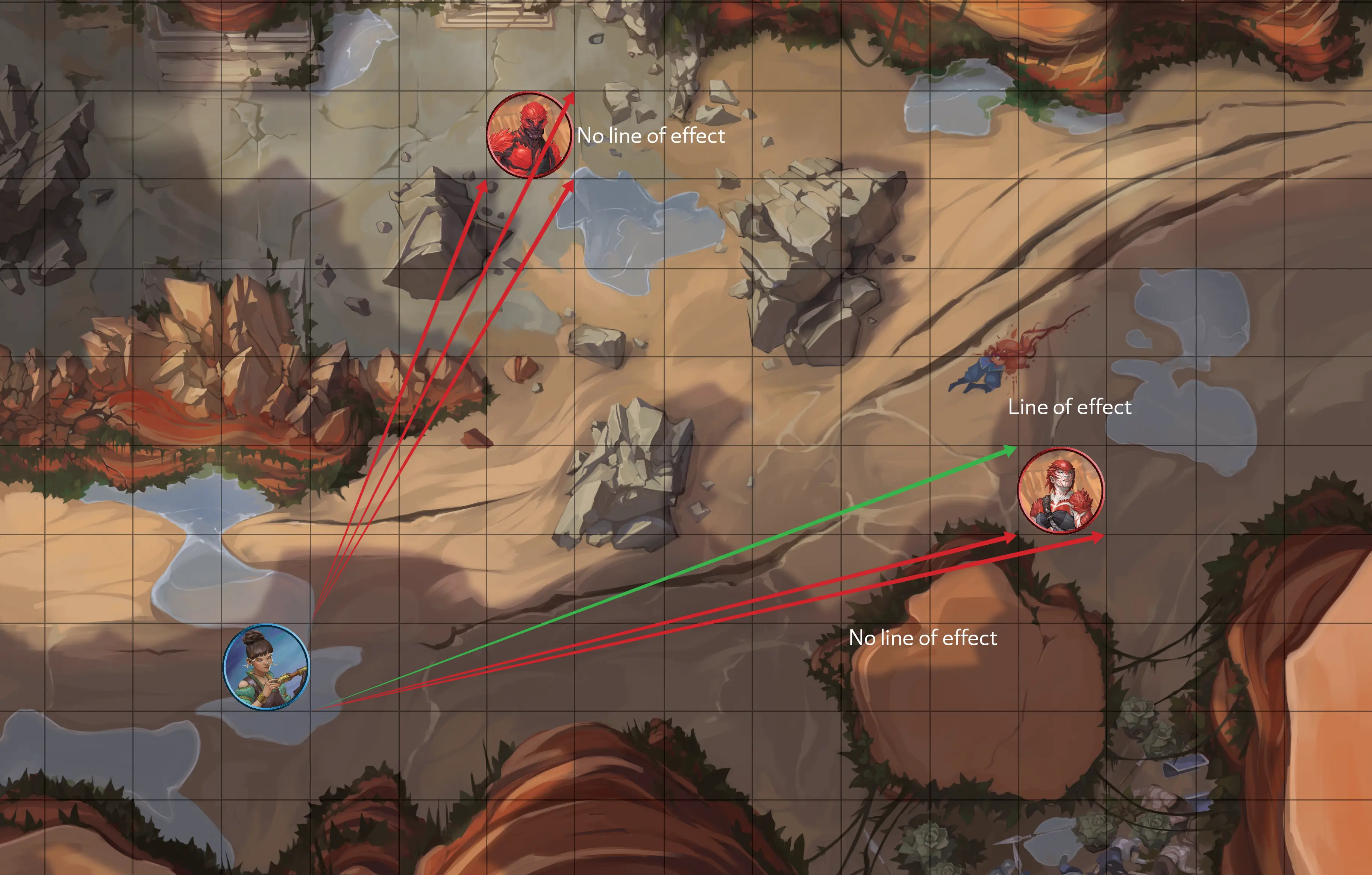
To determine whether another square is in your line of effect (see the earlier "Targeting and Range" section), draw an imaginary line from a corner of your square to any corner of that square. If you can draw that line without passing through or touching a solid object, that square is in your line of effect.
Sizes and Areas of Effect
Each character's space (see "Size and Space") fills a square or squares based on their size. If a miniature you're using doesn't quite match up to those dimensions, that's okay-for simplicity, just use the footprint of the miniature to determine how many squares it takes up on the battlefield. However, use the character's in-game size for calculating all other rules.
When determining areas of effect, their dimensions are outlined in increments of 5 feet, aligning to the lines of the grid. When determining an effect's point of origin, you can start the effect in any space adjacent to a space you occupy (the area doesn't need to include your space). For example, if you target a large area with the Division surge, only one square of that area needs to be next to your square; the rest can extend much farther away from you.
If an effect only impacts a Small (2.5-foot diameter) area, it generally still affects one entire 5-foot square since that is the grid's smallest increment-but the GM might take some creative liberties with resolving the outcome when it suits the narrative.


