

Thread: 5E Table Tools
-
June 23rd, 2026, 19:53 #41High Templar


- Join Date
- Jan 2019
- Location
- Arrakeen, Arrakis
- Posts
- 164
That's what I thought - when Invisible is applied to the NPC, that automatically turns on, both at the top of the CT, and on the NPC entry. Originally Posted by Melborne

/rsi debug for client (me connecting through a client instance on my own PC).
ClientRSIDebug.png
Client Settings:
ClientSettings.png
-
June 23rd, 2026, 19:57 #42Zealot
- Join Date
- Sep 2018
- Location
- Canada
- Posts
- 98
Thanks, this helped me track it down. I have a fix for this now and I’ll be uploading it shortly.. once I figure out this jack of all trades business. Originally Posted by Atreides Ghola
Weekly campaigns deserve better tools.
FGU extensions by Melborne
-
June 23rd, 2026, 20:00 #43High Templar
- Join Date
- Jan 2019
- Location
- Arrakeen, Arrakis
- Posts
- 164
No, Thank you! I love this extension. Originally Posted by Melborne
-
June 23rd, 2026, 21:00 #44Zealot
- Join Date
- Sep 2018
- Location
- Canada
- Posts
- 98
Thanks! Originally Posted by Atreides Ghola
Alright I remove the Spell Action Info when you unlock your character sheet - It won't display the information in the event it overlaps or another extension wants to use the space for unlocked character sheets. As well, I've added a per-user option that allows you to select Static or Scrollable Action tabs. The text location and the jack of all things extension is far more trickier if it continues to try and overlap itself, but I'll add it to my to-do list.
I'll upload the updates shortly!Weekly campaigns deserve better tools.
FGU extensions by Melborne
-
June 23rd, 2026, 21:17 #45High Templar
- Join Date
- Jan 2019
- Location
- Arrakeen, Arrakis
- Posts
- 164
Thanks! They're still there when you lock the sheet again, though.
Also - don't know if you had fixed the invisibility issue? But dropping invisible on a target no longer makes it invisible, so you MUST click the GM visibility button, and still no one with truesight can see.
Seriously sorry for dropping all of this on you.Last edited by Atreides Ghola; June 23rd, 2026 at 21:26.
-
June 23rd, 2026, 21:56 #46Zealot
- Join Date
- Sep 2018
- Location
- Canada
- Posts
- 98
I'm unable to repeat the process, even with the named extensions; As for the invisibility, I've tried now with 3 of my players and they too see the creature. And I just read your PM, I'm glad you found it!
Weekly campaigns deserve better tools.
FGU extensions by Melborne
-
June 24th, 2026, 03:35 #47High Templar
- Join Date
- Jan 2019
- Location
- Arrakeen, Arrakis
- Posts
- 164
So, I just completely wiped out my extensions folder, downloaded everything anew, and started a test campaign with just 5e Table Tools loaded, and same. Perhaps I am setting the CT entry incorrectly? Originally Posted by Melborne
When I first started out today, when I dropped the invisible effect on the monster in the CT, it became invisible to everyone, both VISION: 120 truesight and Truesight 120 on the senses line on the main PC character sheet page.
Now, when I drop the invisible effect on the token, nothing happens at all. I have to manually click the GM hide, and no one can see the invisible creature. I am at a total loss.
-
June 24th, 2026, 03:58 #48Zealot
- Join Date
- Sep 2018
- Location
- Canada
- Posts
- 98
https://i.postimg.cc/8P9Y36rJ/image.png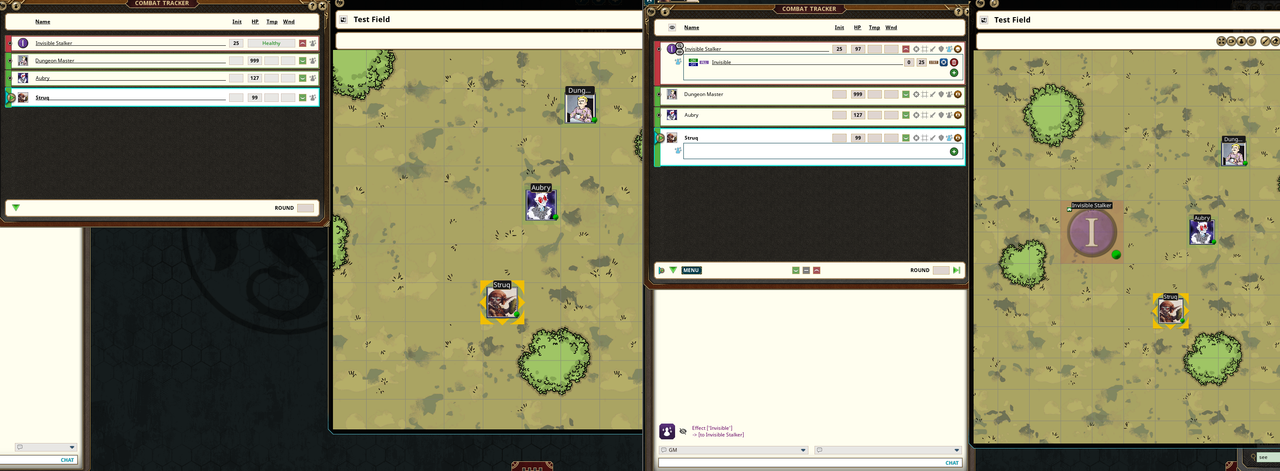
On the left we have Struq, and on the right we have the Dungeon Master's screen. The monster has applied invisibility to itself and Struq is not able to see.
In the debug displays what is invisible and if any connected player can see it. Struq cannot see the creature.
So he casts a spell.
https://i.postimg.cc/wMKV2hrp/image.png
And now he can see it. Or changing it to true sight...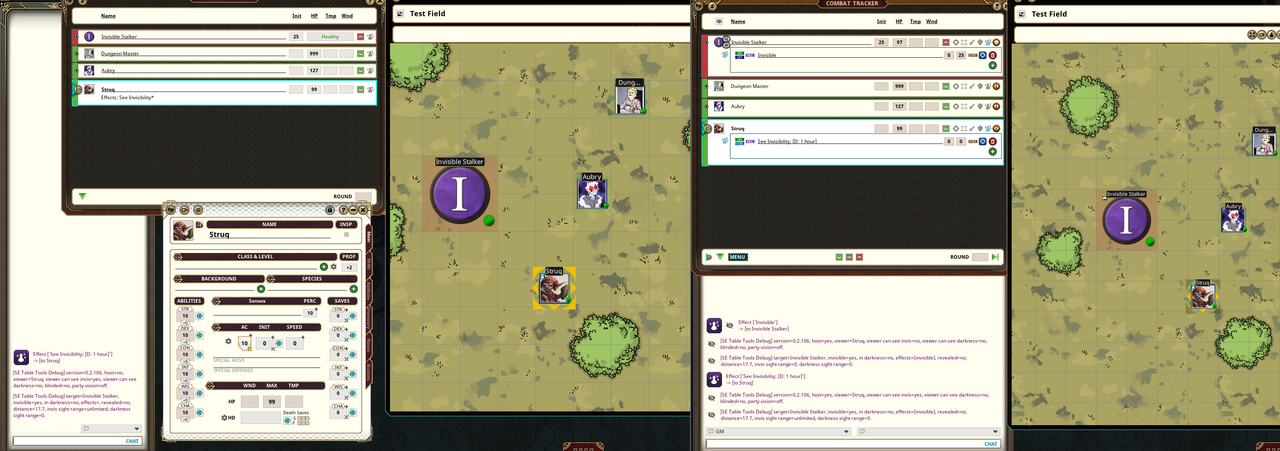
https://i.postimg.cc/4NP6HksD/image.png
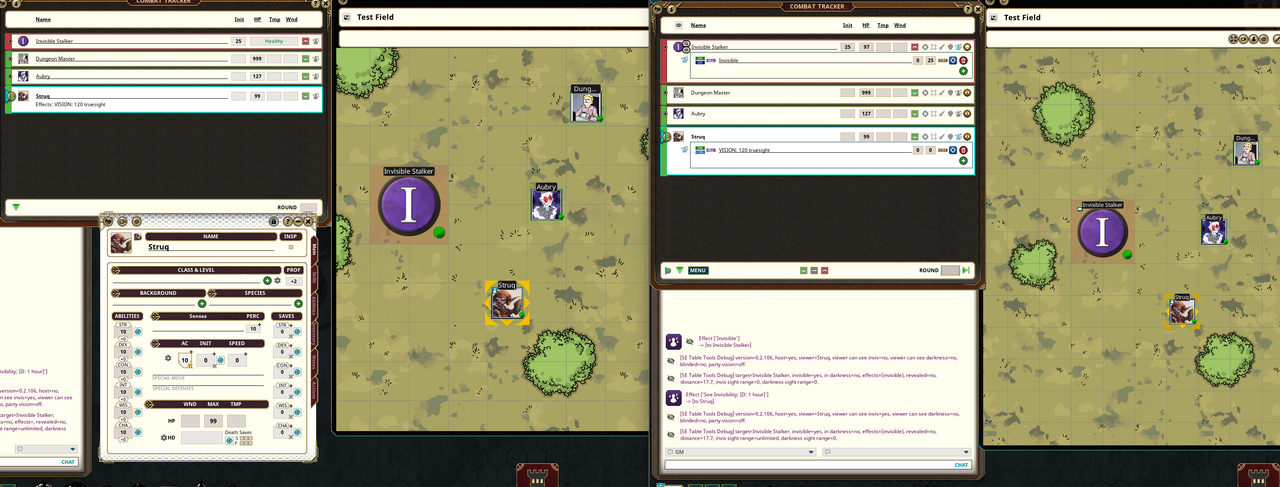
Drop the creature into the combat tracker. Apply invisibility. Login to your server. Apply a way to see invisibility on a character you own. See invisible creatures.Last edited by Melborne; June 24th, 2026 at 12:01.
Weekly campaigns deserve better tools.
FGU extensions by Melborne
-
June 24th, 2026, 13:14 #49High Templar
- Join Date
- Jan 2019
- Location
- Arrakeen, Arrakis
- Posts
- 164
This is what I've been doing.
I was too tired to continue testing last night.
Today, I have a clean campaign, with generic premade characters. I am logged in with two separate player clients - one on my local machine, one from a laptop.
This is the behavior I am seeing after following the steps above up to making the IS invisible:
1) Follow method above.
2) Upon login, neither character can see the Invisible Stalker I have placed on the map.
3) Place See invisibility or VISION: 120 truesight on one character. The Stalker is immediately visible - for both PC clients.
4) Advance turn to the next character - without any way to detect the invisible CT entry, but who can still see the entry.
5) /rsi refresh while on the non-invisible-seeing client character makes the IS invisible - for both clients.
6) Advance turn to PC client with truesight/see invisibility - who can no longer see the client. /rsi refresh makes it visible again to both clients.
7) To be clear, SHARED PARTY VISION AND MOVEMENT is turned off in the 5e Table Tools options. Normally, I have this off in the Fantasy Grounds Token options, but your extension seems to remove that option and place it under the 5e Table Tools options instead.
This is after a clean install of all extensions and the Fantasy Grounds Software itself. In the campaign I wanted to use this in, the behavior is indescribably silly. My test dummy can see the invisible token from anywhere on the map, ignoring LoS, despite my never enabling always on visibility. When I click the GM hide, it becomes visible. If I click the GM hide off, it becomes invisible. If I advance through the rounds to start a new round, the behavior goes back to the previous abnormal (no one can see the invisible entity, regardless of vision capabilities). There's obviously some sort of conflict with another extension I am running.
I feel like this is becoming a fruitless endeavor. I'll have to use other solutions for the invisible condition - though, I would love a way to turn off the visibility functions in 5e Table Tools so that I can run something else without conflict.
Thanks for your help - this seems like an intractable problem for now.Last edited by Atreides Ghola; June 24th, 2026 at 14:04.
-
June 24th, 2026, 13:28 #50High Templar
- Join Date
- Jan 2019
- Location
- Arrakeen, Arrakis
- Posts
- 164
If it helps, here's screenshots with /rsi debug information in the chat of each.
1) Client 1 on laptop. Character has no way to see invisible creatures:
Test1.png
2) Client 2, on my PC. Character has VISION: 120 truesight
Test2.png
3) Both PCs from the GM point of view with /rsi debug info.
Test3.pngTest4.png
Thanks for all the help with this.
Nota bene: If you notice, there is no version information in my debug calls like there is in yours. Perhaps the version on the Forge isn't the same as the one you're using?Last edited by Atreides Ghola; June 24th, 2026 at 13:38.


 Reply With Quote
Thread Information
Users Browsing this Thread
There are currently 1 users browsing this thread. (0 members and 1 guests)
 Posting Permissions

Bookmarks