

Thread: 5E Table Tools
-
June 23rd, 2026, 16:22 #31Zealot


- Join Date
- Sep 2018
- Location
- Canada
- Posts
- 95
 Originally Posted by Atreides Ghola
 I was unable to reproduce this, I tested some random campaigns, random rulesets, and ultimately I wasn't able to make my random Goblin here not see the Invisible stalker. GM hide is On; The Invisible status is applied to the NPC, and as you can see the effect for VISION: 120 truesight is applied to Melborne, the Goblin. And I was able to repeat this with See Invisibility, removing the effect the NPC vanished from the Goblin's sight. Ensure that the Invisibility status is applied to your creature; It does not allow players to see GM Hidden creatures or tokens without it.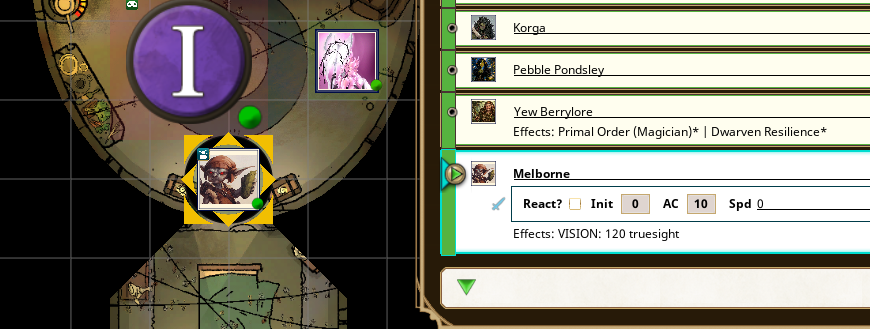
Last edited by Melborne; June 23rd, 2026 at 16:34.
Weekly campaigns deserve better tools.
FGU extensions by Melborne
-
June 23rd, 2026, 16:25 #32Zealot
- Join Date
- Sep 2018
- Location
- Canada
- Posts
- 95
Can you provide a screenshot example? I regret trying to /scaleui 50, then 400 but I wasn't able to see these issues. Originally Posted by dittotb
Weekly campaigns deserve better tools.
FGU extensions by Melborne
-
June 23rd, 2026, 16:30 #33Zealot
- Join Date
- Sep 2018
- Location
- Canada
- Posts
- 95
Yes that is correct. There is an additional feature on its way to 5e Table Tools that will allow specific settings for your paladin to help fix those kinds of minor issues. As it stands the effect currently needs to be applied before the attack; counter intuitive I know, especially on crits... I apologize to your paladin! Originally Posted by Atreides Ghola
Thank you for pointing that out, I think I might have a quick fix for that. I'll try something this afternoon and patch it.
Your third point there, is your character sheet is unlocked? I'll remove the spell action information when a character sheet is unlocked to fix that text overlap, that's what I think you're seeing..Last edited by Melborne; June 23rd, 2026 at 16:32.
Weekly campaigns deserve better tools.
FGU extensions by Melborne
-
June 23rd, 2026, 16:48 #34High Templar
- Join Date
- Jan 2019
- Location
- Arrakeen, Arrakis
- Posts
- 164
Could you clarify "GM Hide is On" for me? Originally Posted by Melborne
This is what I am seeing in game:
Invis.png
-
June 23rd, 2026, 16:54 #35High Templar
- Join Date
- Jan 2019
- Location
- Arrakeen, Arrakis
- Posts
- 164
For the third point - Initially, when you load in and the sheets are locked, the overlap is not there. If you unlock the sheet they appear, and remain after you lock it again. Originally Posted by Melborne
-
June 23rd, 2026, 17:17 #36High Templar
- Join Date
- Jan 2019
- Location
- Arrakeen, Arrakis
- Posts
- 164
This is what he means, I believe: Originally Posted by Melborne
The paladin here has a lot of weapons. If the sheet is too short, it doesn't show the spell area of the sheet. (Sheet 1)
If you lengthen the sheet, the spell area can be seen, but it gets smaller and smaller, depending on the length of the weapon list. (Sheet 2)
My paladin has just been collapsing the Weapons area to get to the rest of the sheet. (Sheet 3)
sheet1.png
Sheet2.png
sheet3.png
-
June 23rd, 2026, 17:54 #37High Templar
- Join Date
- Jan 2019
- Location
- Arrakeen, Arrakis
- Posts
- 164
So, here is what I am seeing from a player and GM perspective with nothing loaded except 5e Table Tools, AoE Targeting, and 5e Smart NPCs (all your extensions). I put in a test dummy character, and replaced the Legacy Barlgura with a 2024 version.
Player:
TestDummy1.png
GM View:
TestDummy2.png
Invisible is on the Barlgura, VISION: 120 Truesight is on the Test dummy.
-
June 23rd, 2026, 19:33 #38High Templar
- Join Date
- Nov 2020
- Location
- UTC-5
- Posts
- 180
Hi Gholas! Just to add to this, this extension seems to interfere with the Jack of All Things functionality to collapse actions on PC actions tab. When you removed it, the actions would collapse. Adding it keeps the buttons but clicking "+ / -" no longer has any effect. Originally Posted by Atreides Ghola
-
June 23rd, 2026, 19:40 #39Zealot
- Join Date
- Sep 2018
- Location
- Canada
- Posts
- 95
The Show/Hide NPC eye-icon; Can you show me your Table Tools visibility options and /rsi debug from the player client that cannot see the creature. Originally Posted by Atreides Ghola
My screenshot was from a player point of view, not DM.
I've fixed the text issue for the next update.Last edited by Melborne; June 23rd, 2026 at 19:47.
Weekly campaigns deserve better tools.
FGU extensions by Melborne
-
June 23rd, 2026, 19:40 #40High Templar
- Join Date
- Jan 2019
- Location
- Arrakeen, Arrakis
- Posts
- 164
You can still collapse each entry by clicking on the banner for Weapons, Class Features, Spell (Level), etc.
But yes, it does conflict with Jack of All Things.


 Reply With Quote

Thread Information
Users Browsing this Thread
There are currently 1 users browsing this thread. (0 members and 1 guests)
 Posting Permissions

Bookmarks