

Thread: Table Tools Desktop
-
June 18th, 2026, 21:24 #1Zealot


- Join Date
- Sep 2018
- Location
- Canada
- Posts
- 79
Table Tools Desktop
Table Tools Desktop
Table Tools Desktop adds a dock for minimized Fantasy Grounds windows, giving your desktop a cleaner place to store the windows you want to come back to.
Instead of minimized window bubbles being scattered across the tabletop, supported windows can be docked into a visible desktop bar. Clicking a docked icon restores the window and removes it from the dock. An example here, I have set the dock the size I desired and begun to fill it with my planned windows, with the Title setting turned on rather than off or hover, so I can see what the names of the objects are.

A parcel, encounter, map, quest, story page, item, feat, table, spell, location and player notes. Each have options based on what it is, or what it's for; If I wish to award the party the parcel for their quest, I can right-click it and Add to the Party-Sheet, or right-click the encounter and add it to the Combat Tracker.
Adjust the slots to your desired fit, if you're looking to store a few items to span a whole second monitor you can select between 5 and 30 slots of minimized windows.
This is intended for GMs and players who regularly keep maps, NPCs, encounters, parcels, character sheets, reference windows, and other records open during play.
Features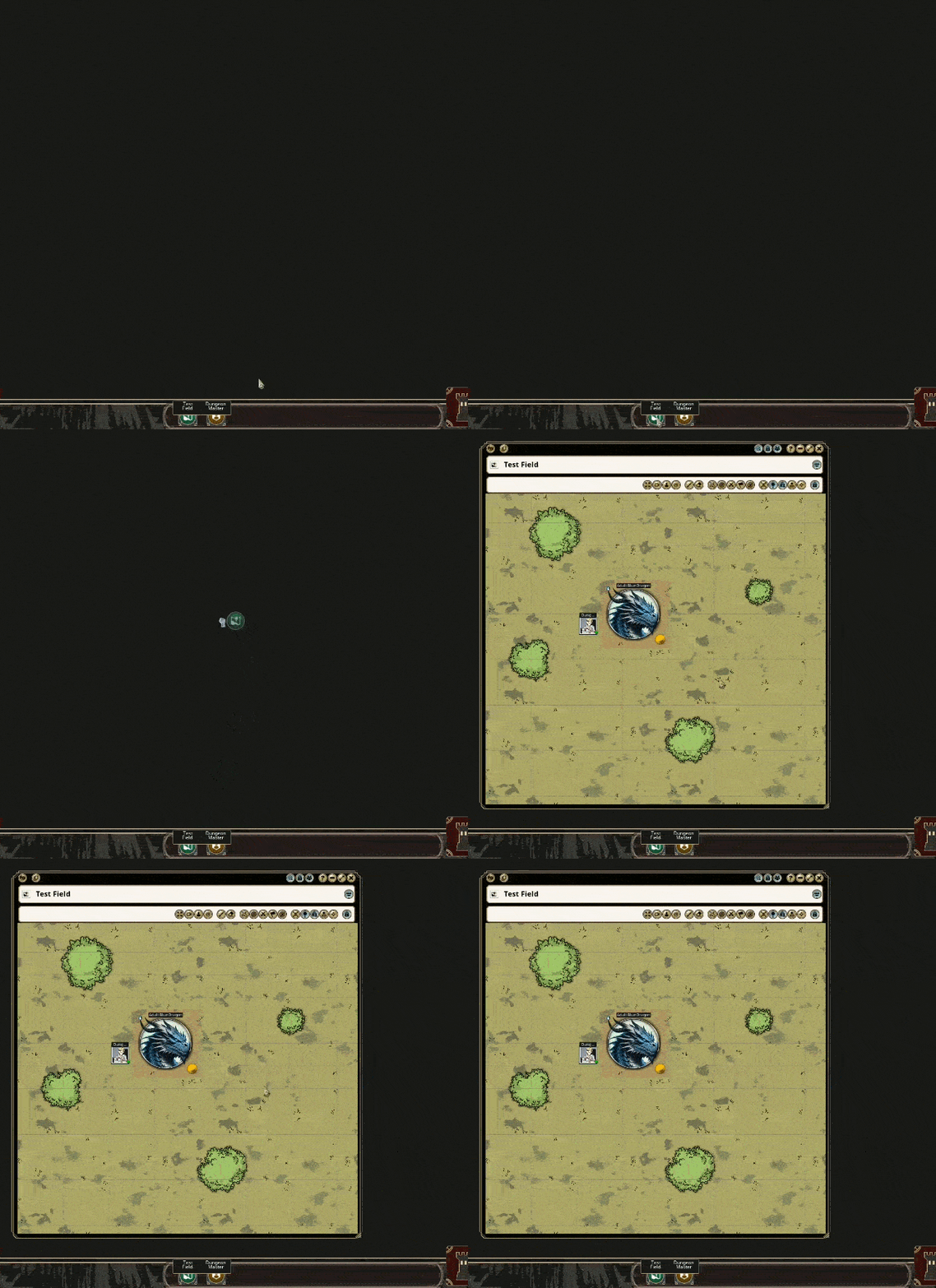
- Adds a desktop dock for minimized windows
- Automatically creates dock entries when supported windows are minimized
- Click a docked icon to reopen the window, or drag it from the dock into the desktop to open it while keeping it active on the dock tray
- Supports saved dock entries between sessions
- Option to choose how many dock slots are available
- Optional dock title display modes
- Option for customizable dock themes to match popular FGUVTT themes and provide personalization between users/gm's and players
- Right-click support for useful record actions where Fantasy Grounds allows them: add to combat tracker, party sheet, share
- Removes the normal floating minimized bubble after docking
- Drag and drop windows into the dock, drop into specific locations to organize or drag and drop to reorganize
- Change the icons of the docked windows via the right-click menu
- Horozontial and Vertical orientation support
Notes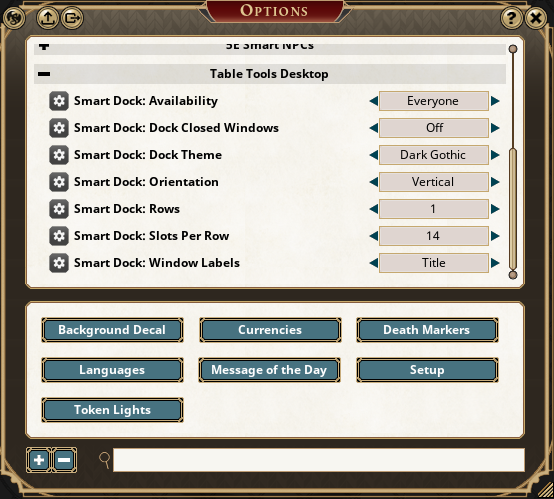
- Some Fantasy Grounds right-click menu entries are inserted by the ruleset or engine (Window).
- Available dock actions depend on the type of record being docked.
- The dock is designed to feel like part of the normal Fantasy Grounds desktop rather than a separate control panel.
Forge
Table Tools Desktop on the Forge
Changelog
19/6/2026 Fixed a text scaling/UI issue between themes. Added custom themes; Core Gold, Gothic, Frost, Futuristic, Parchment, Simplistic, White Nobility. Additionally four added themes designed to match popular FGU Themes: Western, Industrial, Winter and New Gothic.
19/6/2026 Made some slight changes to its starting point to not overlap the dice tower if that's where people keep it, thought I'd get ahead of any suggestions if that became one.
19/6/2026 Fixed off-state visibility, prevented accidental dock closing, cleaned up duplicate dock windows (a bug I made trying to fix a bug), improved icon display in masked rulesets/themes, changed the default frame to Core Gold, and added two extra themes; Mel's Gold/Silver core.
19/6/2026 Added a Dock Closed Windows option for that one player we know who "Accidentally" closes everything, allowing closed windows to be sent to the dock instead of being lost when accidentally closed.
19/6/2026 Added multiple dock row options, ranging from 1x5 to 1x30, and 2x5 to 2x30 slots for saved windows.
19/6/2026 Added drag-and-drop docking for record shortcuts, allowing NPCs, images, parcels, encounters, notes, items, stories, and similar records to be dropped directly onto the dock. Added dock rearranging by dragging docked icons into a new order, or what isn't docked into a specific location for your OCD.
20/6/2026 Added CallOfCthulhu7E, and fixed a dock-entry restore bug on restart.
20/6/2026 Changed the Table Tools Desktop extension to support a vertical dock orientation option, and fixed a bug that effected vertical rows.
Last edited by Melborne; Yesterday at 20:44. Reason: Changelog
Weekly campaigns deserve better tools.
FGU extensions by Melborne
-
June 19th, 2026, 09:04 #2High Patriarch
- Join Date
- Mar 2020
- Location
- United Kingdom
- Posts
- 600
Mate, it's fantastic!
Just some minor notes which hopefully are an easy fix:
- in your pictures, it looks like there's a frame around the dock, but in my test it doesn't show. It's not just a stylistic thing, it makes it a bit harder to right click to unlock and drag to reposition
- The titles don't show as neatly as in your screenshot, they're cut in half (see picture)
I don't know if these issues are theme-specific, I used the default theme for D&D 5ePlease consider voting for these features:
Feature idea: add a toolbar/dockbar for FGU windows to minimise into (Discussion and examples here)
(If you like the above idea, click here to get an extension that does just that)
-
June 19th, 2026, 11:55 #3Zealot
- Join Date
- Sep 2018
- Location
- Canada
- Posts
- 79
Glad to hear it. I’m actually pretty happy with how this one turned out, and I think it’ll be very popular at my game tonight.
The frame is from the theme I was using, so it’s probably not universal. That was an oversight on my part, so I’ll need to pull out the trusty MS Paint and make my own. I also made the dock scale with the UI setting, and I think the title issue is a funky combination of that scaling plus the space I gave the text and.. reduced size for the second line.
I think I have a solution, though. I’ll push it out today!Weekly campaigns deserve better tools.
FGU extensions by Melborne
-
June 19th, 2026, 12:03 #4Warrior-Priest
- Join Date
- Nov 2019
- Location
- Tampa Bay
- Posts
- 45
This looks to be super useful. Just picked this up and I can't wait to try it out this weekend!
-
June 19th, 2026, 13:02 #5High Patriarch
- Join Date
- Mar 2020
- Location
- United Kingdom
- Posts
- 600
To be clear, it's already a BIG step up in usability from the bubbles, for me! Originally Posted by Melborne

I haven't looked into how themes work in FGU, but wouldn't it be wiser to, instead of creating your own graphics, reuse something like the frames and backgrounds of the windows? That way they should already adapt to different themes (assuming you have a way to reference them without pointing to the specific assets of a theme but by name/tag/type/style selector or something along those lines)Please consider voting for these features:
Feature idea: add a toolbar/dockbar for FGU windows to minimise into (Discussion and examples here)
(If you like the above idea, click here to get an extension that does just that)
-
June 19th, 2026, 13:18 #6Zealot
- Join Date
- Sep 2018
- Location
- Canada
- Posts
- 79
That makes sense, and that was actually my first approach. And where the invisible parts came in with your testing. But I think I have a pretty good solution here, I'll upload this in a minute or two!
Try a few themes and let me know.Weekly campaigns deserve better tools.
FGU extensions by Melborne
-
June 19th, 2026, 13:33 #7Zealot
- Join Date
- Sep 2018
- Location
- Canada
- Posts
- 79
Can't wait to hear what you think! Originally Posted by Ravanazar
Weekly campaigns deserve better tools.
FGU extensions by Melborne
-
June 19th, 2026, 14:52 #8Moderators Immortal
Supreme Deity
- Join Date
- May 2011
- Location
- Colorado, USA
- Posts
- 34,718
This looks great!
A couple of things when initially using this:
1) There's a right-click close option. If I select that, the whole window closes (expected), but how do I get it back?
2) I don't see any icons for the minimized entries when using with the PFRPG2 (Pathfinder 2e) ruleset - just big black circles. No other extensions loaded. This is even for generic windows (images, etc.).FG Wiki: How to Compile the FG Logs
Private Messages: My inbox is forever filling up with PMs. Please don't send me PMs unless they are actually private/personal messages. General FG questions should be asked in the forums - don't be afraid, the FG community don't bite and you're giving everyone the chance to respond and learn!
-
June 19th, 2026, 15:01 #9High Patriarch
- Join Date
- Mar 2020
- Location
- United Kingdom
- Posts
- 600
The titles now are perfect, I can read the text fully or almost fully (when the title is too long - but there's enough text visible to understand what each icon is, just like on an OS toolbar/dockbar). Originally Posted by Melborne
The frame though... Still not appearing I don't have any other extension loaded, only Table Tools Desktop.
Here's the themes I've tried:
Core:
Core dark:
Default:
D&D:
FG Wizards Desk:
What theme did YOU use for that screenshot?Please consider voting for these features:
Feature idea: add a toolbar/dockbar for FGU windows to minimise into (Discussion and examples here)
(If you like the above idea, click here to get an extension that does just that)
-
June 19th, 2026, 15:10 #10Zealot
- Join Date
- Sep 2018
- Location
- Canada
- Posts
- 79
Thank you! Originally Posted by Trenloe
Hmm. I see. And a console errors if you try changing its visibility/options while closed. I've added a simple recovery command, and a failsafe to reopen it if it's accidentally closed. The icons there are being masked by Fantasy Grounds, I think I can work around this. Thanks for your report, I think I have a quick solution and should be able to push an update shortly.
Oh.. I meant the dock themes, not FGU themes! I apologize, head over into your options and give it a test! Originally Posted by Lo Zeno
This screenshot was taken on PF2 while I tested out the icon image bug.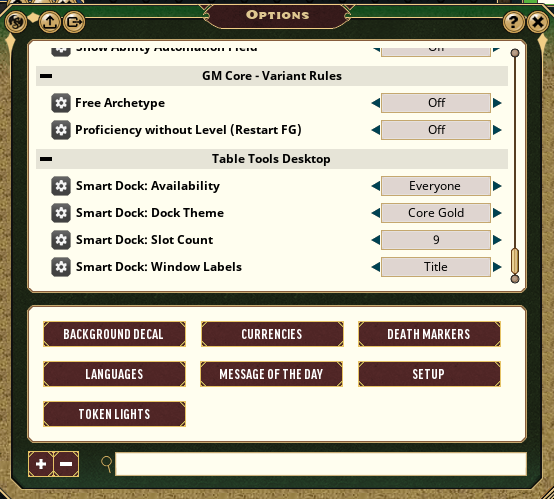
Last edited by Melborne; June 19th, 2026 at 15:25. Reason: Added Options screenshot
Weekly campaigns deserve better tools.
FGU extensions by Melborne


 Reply With Quote


Thread Information
Users Browsing this Thread
There are currently 1 users browsing this thread. (0 members and 1 guests)
 Posting Permissions

Bookmarks