

Thread: 5E Table Tools
-
June 16th, 2026, 14:51 #1Zealot


- Join Date
- Sep 2018
- Location
- Canada
- Posts
- 81
5E Table Tools
5E Table Tools
5E Table Tools is a Fantasy Grounds Unity extension for the 5E ruleset that improves spellcasting, weapon attacks, ammunition tracking, movement, NPC combat tools, and turn tracking.
It is built around the normal Fantasy Grounds character sheet, Combat Tracker, map, and chat. The goal is to reduce repeated manual steps without replacing how Fantasy Grounds already plays... And maybe fix a few things, like static spell slots and collapsing the mile long list of weapons. See the scroll bar.
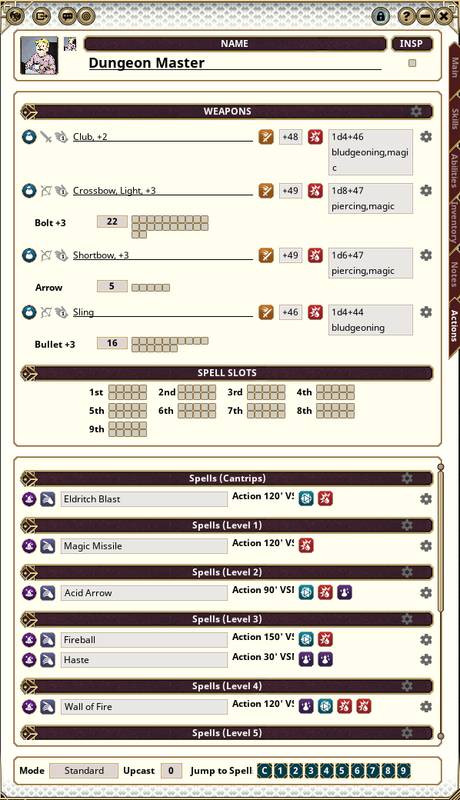
Table Tools was designed for compatability with other extensions and was built with those in mind.
Forge Link
https://forge.fantasygrounds.com/shop/items/3393/view
Major Features
- Spellcasting tools, spell use automation, and upcasting support
- Magic Missile and Eldritch Blast handling
- Weapon Auto Attack buttons
- Weapon Mastery support
- Ammo Manager for arrows, bolts, magical ammunition, quivers, cases and pouches
- Undo current Actor's turn
- Movement tracking and optional movement limit enforcement
- NPC lair action, legendary action, and legendary resistance helpers
- NPC spell slot and innate casting tracking
- Configurable options for how much automation and chat output you want
This is a big extension with a lot of bits, so I will be breaking it down to different posts so I am not limited by my 4000 character maximum per post and still be able to provide detail to the inner workings of the extension.
Clicking a link below opens a new window, I warn you now!
Feature Posts
- Overview and Changelog
- Spellcasting and Upcasting
- Weapon Attacks and Weapon Mastery
- Ammo Manager
- Movement Tracking, Undo Turn and Visibility Rework
- NPC Combat Helpers
- Options and Setup
- Reserved
A big thank you to my D&D group for their support and of course testing my creations, even that awful restart mid-weekly game to bug fix. This has been in the making for too many months, but I'm so grateful I'm able to publish it! And a special thanks to Iggy for letting me use her hand drawn tokens for my examples.
Commands
5E Table Tools mostly works through the native character sheet, Combat Tracker, Actions tab, and right-click menus. The slash commands below are available for troubleshooting or quick table control.
- /upcast refresh - Refreshes cantrip scaling on character sheets (not needed, but just in case).
- /emove status - Reports movement tracking hook/status information.
- /emove debug - Toggles movement debug output.
- /emove refresh - Refreshes active map token movement tracking.
- /emove reset - Resets tracked movement spent for combatants.
- /emove undo - Returns the active combatant to their recorded turn-start position when movement tracking is enabled.
- /ca undo - Restores the current turn snapshot. Host only.
- /ca status - Reports the current turn undo snapshot status.
- /combatassistant undo - Same as /ca undo.
- /combatassistant status - Same as /ca status.
Right-Click Commands
- Combat Tracker: Undo Turn - Host-only right-click command that restores the current turn snapshot without typing a slash command.
Customized map tools to allow users quick access to edit map settings when using ultrawide and extremely large monitor setups.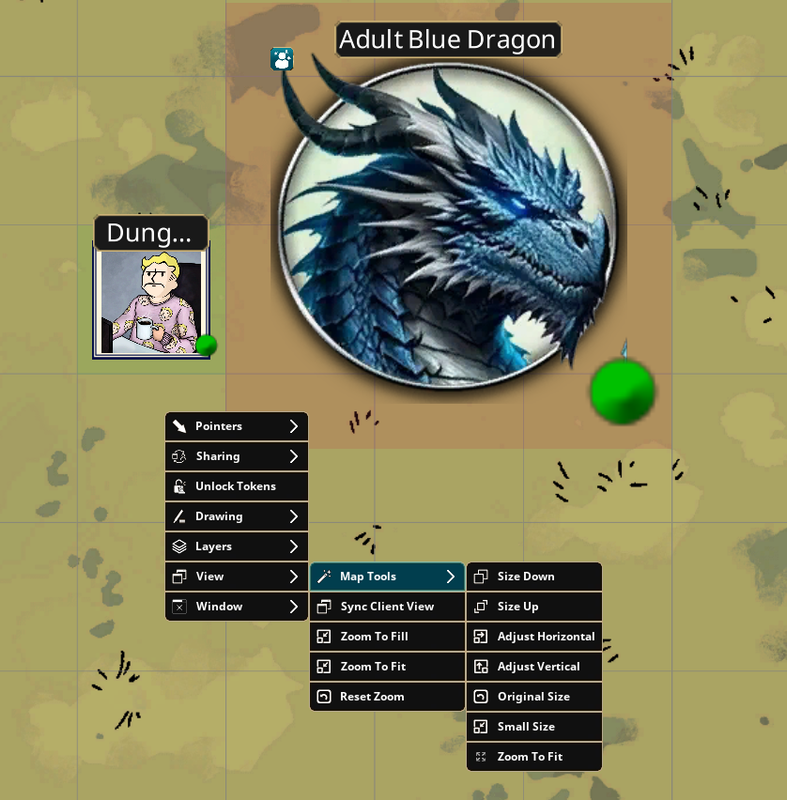
Changelog
17/6/2026 Combined Visibility Reworked into Table Tools to add to the all in-one package.
18/6/2026 Improved movement effect handling and expanded support for common speed adjustment syntax used by other extensions and effect packs. Improved auto-attack resolution after recent Fantasy Grounds updates. Auto attacks should now resolve damage more reliably after a confirmed hit while still respecting normal attack results.
19/6/2026 Fixed a reported bug that Table Tools couldn't see the Topple tag, now reports via the effectmanger with no issues. Added a QOL feature to right-click maps and resize, much like the buttons native to maps on fantasy grounds, for ease of use when using multiple or extremely large monitors.
Last edited by Melborne; Today at 01:16.
Weekly campaigns deserve better tools.
FGU extensions by Melborne
-
June 16th, 2026, 14:52 #2Zealot
- Join Date
- Sep 2018
- Location
- Canada
- Posts
- 81
Overview
5E Table Tools adds a collection of table-facing tools for common 5E combat tasks.
The extension focuses on actions that come up constantly during play: casting spells, upcasting, resolving attacks, using ammunition, tracking movement, and managing NPC resources. It does not try to replace the character sheet or Combat Tracker. Instead, it adds controls and automation directly where those actions already happen.
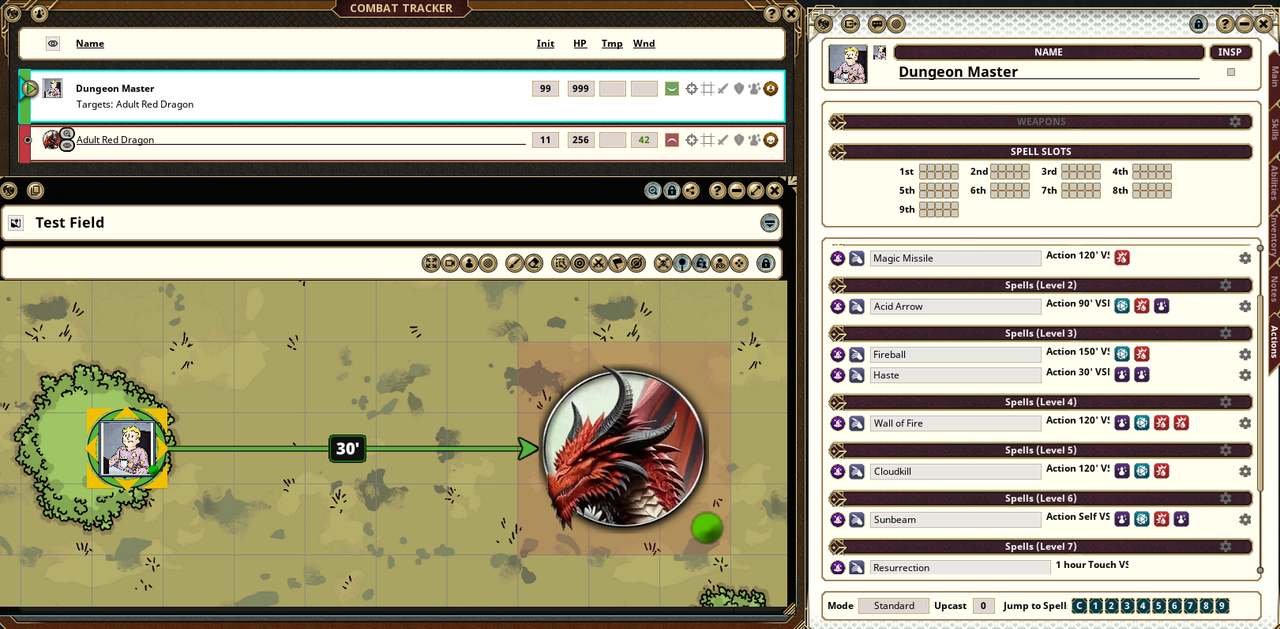
What It Helps With
- Fewer repeated clicks for spell and weapon use
- Cleaner handling for spell slots and upcast values
- Automatic attack and damage resolution when appropriate
- Ammunition selection and magical ammo support
- Movement tracking during combat
- NPC helper actors for lair and legendary actions
- Less manual tracking for spellcasting NPCs
Most features can be adjusted from the Fantasy Grounds Options window.
Of course complete support if using AoE Targeting and the 5E Group Initiative extensions. Both of which by me, Melborne.
5E Table Tools is the complete collection of unique quality of life features, some standalone extensions have
been created from 5E Table Tools and can be purchased from the Fantasy Grounds Forge
5E Smart NPCs
5E Smart Quiver
Visibility Reworked
Last edited by Melborne; June 18th, 2026 at 02:17.
Weekly campaigns deserve better tools.
FGU extensions by Melborne
-
June 16th, 2026, 14:52 #3Zealot
- Join Date
- Sep 2018
- Location
- Canada
- Posts
- 81
Spellcasting and Upcasting
5E Table Tools adds spell controls to the Actions tab so spellcasting and upcasting can be handled directly from the character sheet in multiple ways as shown below. Either by right-clicking the spell and upcasting to the desired spell level with automatic casting and resolving, to the classic and nostaglic text box casting while clicking the Use-Power button native to Fantasy Grounds Unity. Of course you can just cast spells that way too without any form of upcasting.
Of course complete support if using the AoE Targeting extension. By me, Melborne.
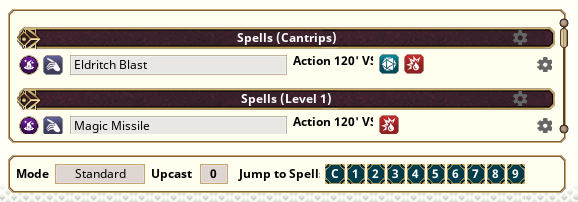
The Upcast value can be changed before casting. Supported spells use that value when resolving damage, healing, or other spell actions.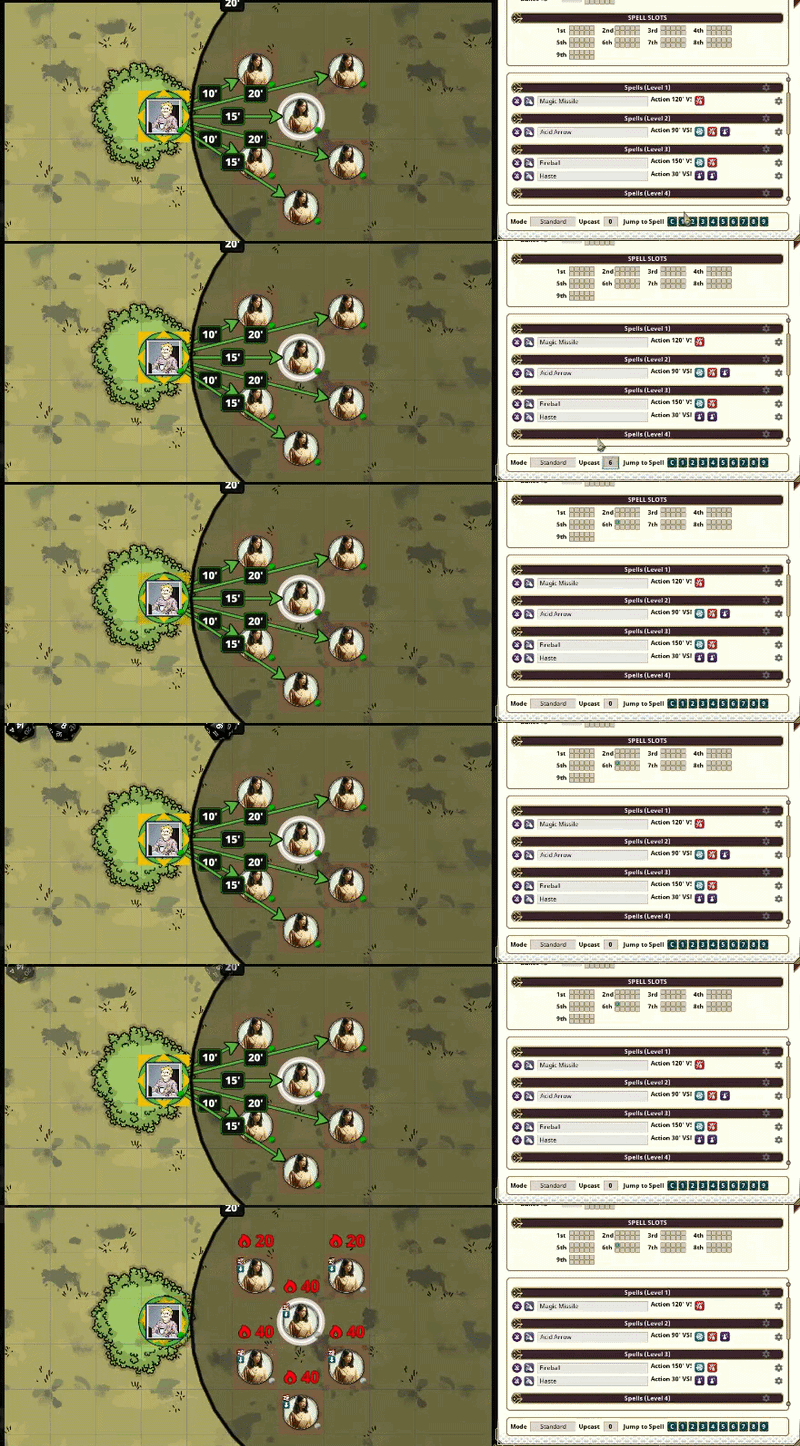
Some spells need special handling because they do not behave like a single normal damage roll. Magic Missile is handled as a multi-damage spell. And just like Eldritch blast, Magic Missile will indivually apply damage to individual targets even if you're selecting 10.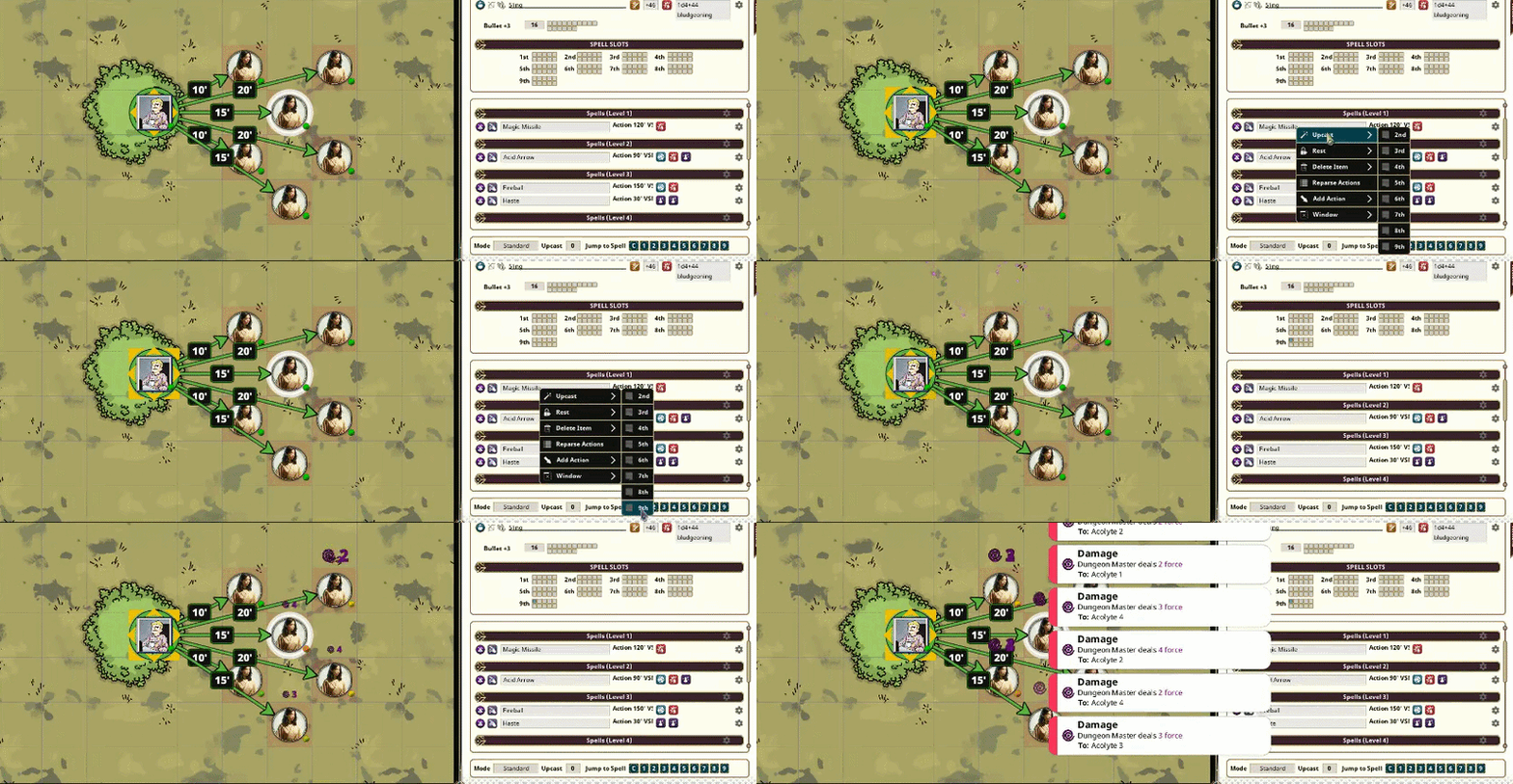
A very exciting feature of Table Tools is the static Spell Slots which are visible no matter how far down you scroll through your spell book, you won't need to second guess what slots you have available. Along with quick jump buttons as shown above to directly jump to a level of spell instead of scrolling - displaying only buttons to the spells/slots you have - which becomes especially important to spellcasters with very large spellbooks!Cantrips automatically adjust when added to your character sheet or when you level up. No additional editing is required as long as the cantrip follows Fantasy Grounds Unity’s recognized spell syntax and prefixes.
Spellcasting Features
- Use Power support from the Actions tab
- Upcast controls for supported spells
- Spell level jump buttons
- Magic Missile support
- Eldritch Blast beam handling
- NPC spell slot and innate casting tracking
- Automatic Cantrip damage, adjusted upon leveling up or adding a new cantrip to your spellbook
Last edited by Melborne; June 16th, 2026 at 21:20.
Weekly campaigns deserve better tools.
FGU extensions by Melborne
-
June 16th, 2026, 14:53 #4Zealot
- Join Date
- Sep 2018
- Location
- Canada
- Posts
- 81
Weapon Attacks and Weapon Mastery
5E Table Tools adds Auto Attack support for weapons on the Actions tab.
Auto Attack rolls the attack and, when the attack hits, resolves damage against the target. This is meant for fast table use while still using Fantasy Grounds targeting, attack rolls, damage rolls, and chat output.
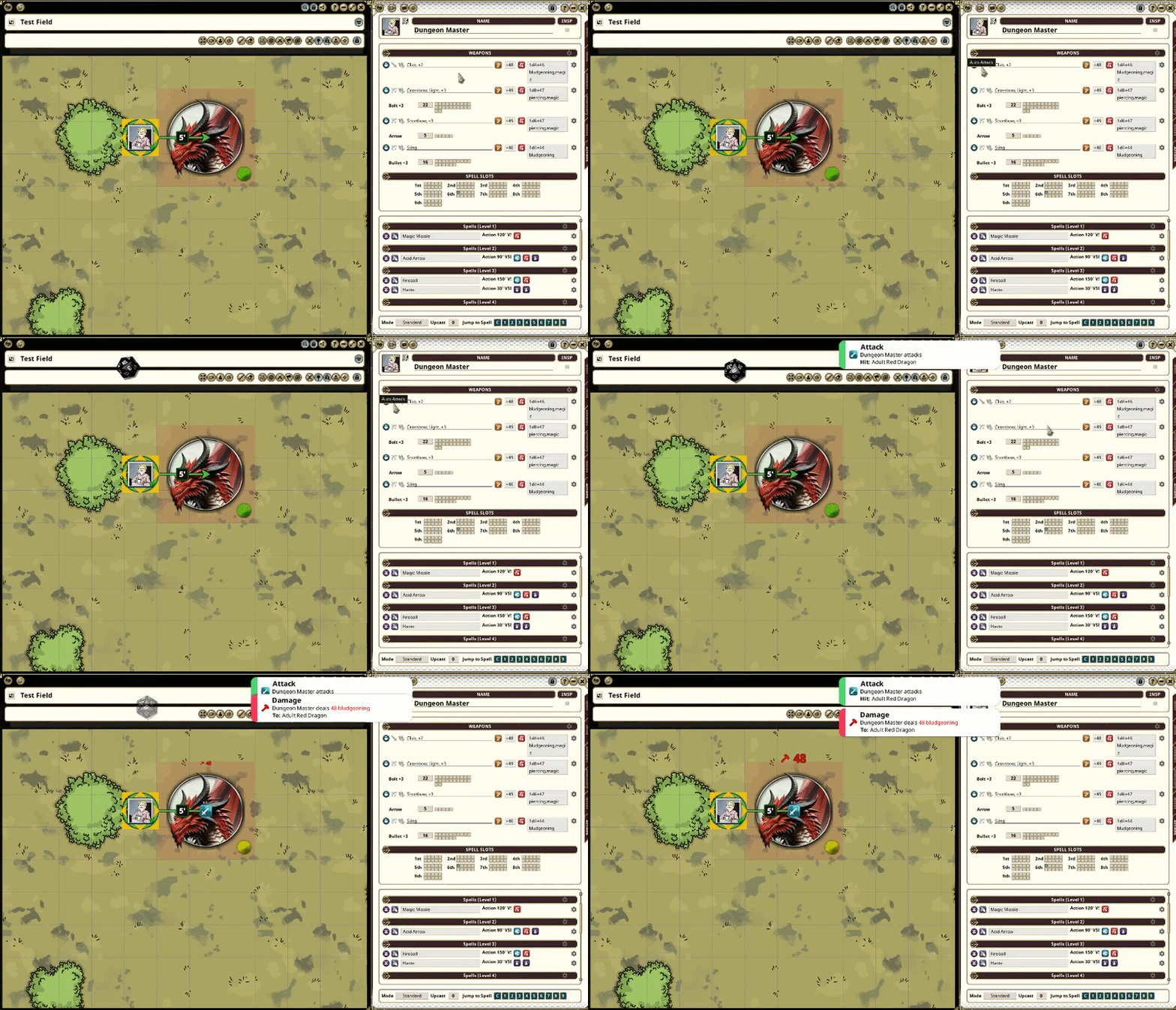
Weapon Mastery support is also included for the 2024 5E rules. Weapons can display their mastery property and provide additional controls where appropriate. And yes, Push.. Pushes. A special flavored attack icon is placed for specific masteries that support extra attacks, or special attacks, and can be found next to the text box that appears when Masteries are selected.
Weapon Features
- Auto Attack button for weapon attacks
- Hit detection followed by automatic damage resolution
- Weapon Mastery field support
- Nick support for extra attacks
- Additional mastery support where automation is practical
- Optional helper notices in chat
Last edited by Melborne; June 16th, 2026 at 16:33.
Weekly campaigns deserve better tools.
FGU extensions by Melborne
-
June 16th, 2026, 14:53 #5Zealot
- Join Date
- Sep 2018
- Location
- Canada
- Posts
- 81
Ammo Manager
Interested in a standalone extension for my Ammo Manager? Check out my Forge Link.
Ammo Manager adds better ammunition handling for ranged weapons.
It can read ammunition from equipped containers such as quivers and pouches, let the player choose which ammunition is currently being used, and update the Actions tab label to match.
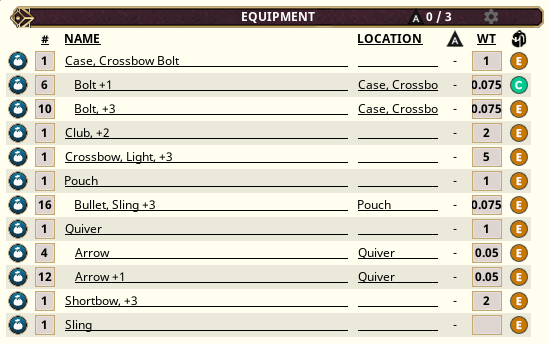
Right-click the ammunition area on the Actions tab to select available ammunition.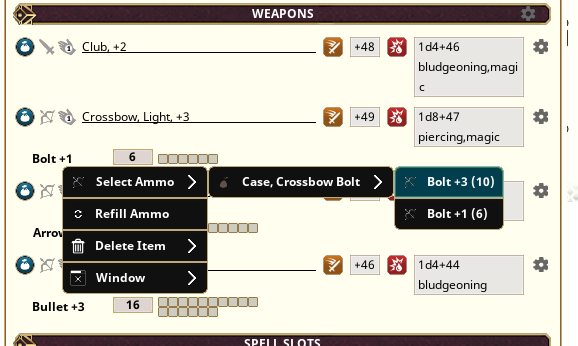
Switching ammunition updates the Actions tab so the selected ammo is clear before attacking.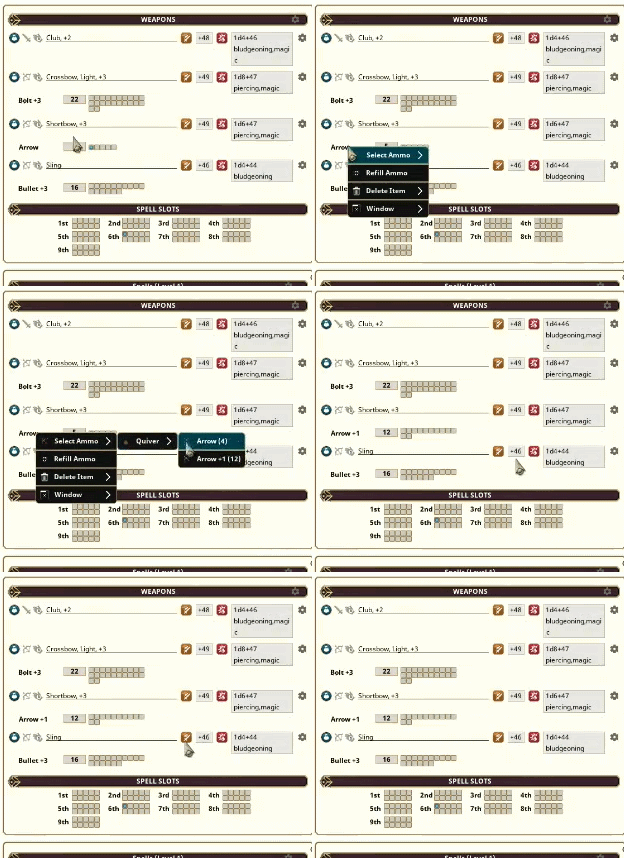
Magical ammunition can apply its bonus when used, while normal ammunition can be tracked or treated as limitless depending on your table preference.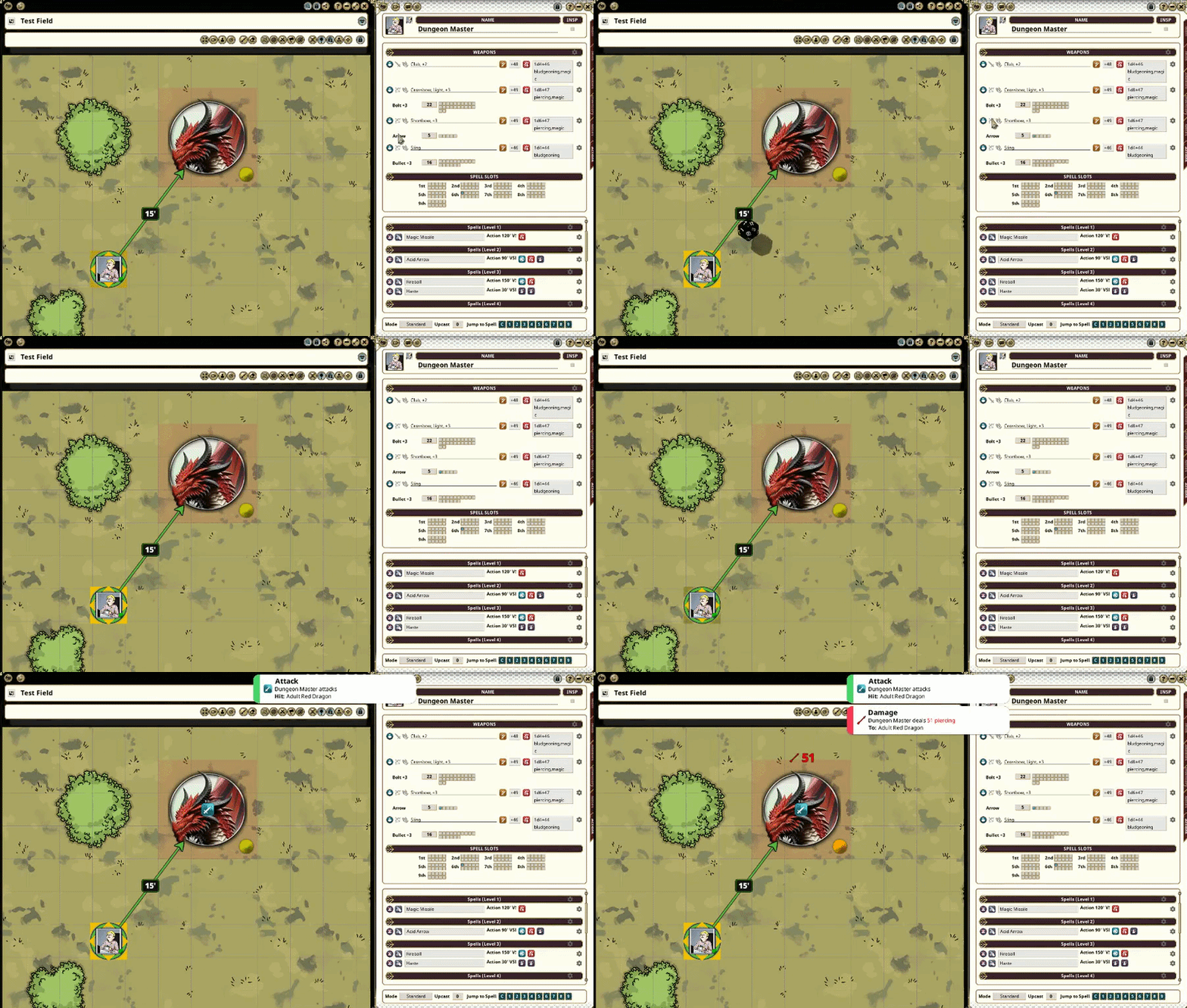
Ammo Features
- Supports arrows, bolts, and similar ammunition
- Reads ammunition from equipped containers
- Supports cases, quivers and pouches... Make sure you equip them
- Allows choosing which ammunition type is currently loaded
- Displays the selected ammunition on the Actions tab
- Supports magical ammunition such as +1, +2, +3 arrows and other magical arrows.
- Can track all ammo, only magical ammo, or disable ammo management
- Can treat non-magical ammunition as limitless or tracked
Last edited by Melborne; June 16th, 2026 at 21:32.
Weekly campaigns deserve better tools.
FGU extensions by Melborne
-
June 16th, 2026, 14:54 #6Zealot
- Join Date
- Sep 2018
- Location
- Canada
- Posts
- 81
Movement, Turn Tracking, and Visibility
5E Table Tools can track token movement during combat, optionally enforce movement limits, and help keep map visibility closer to what each character should actually perceive.
This is intended to help groups that want movement measured during turns without the GM needing to manually count every square. It also tracks movement across the whole turn, including move - attack - move.
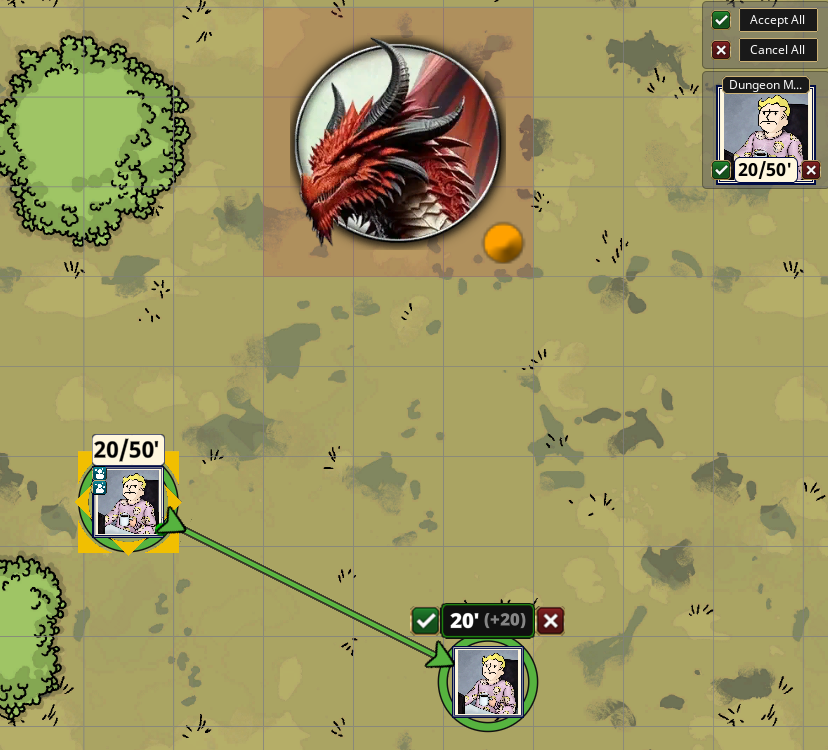
Based on your table rules, you can restrict players from moving past their allowed movement speed or let them exceed it. This part of Table Tools also looks for special statuses on your characters such as spells, terrain conditions, and normal movement modifiers found in Fantasy Grounds Unity and used by many other popular extensions, which display different maximum movement speeds based on these effects.
Movement Features
- Tracks movement during combat
- Optional movement limit enforcement
- Can reset movement tracking around turn changes
- Works with normal map movement
- Designed to reduce GM bookkeeping during tactical combat
Turn Undo
Table Tools also includes a turn undo option for movement mistakes.
If a player moves the wrong token, drags too far, or realizes they started from the wrong square, the movement undo command can return the active combatant to their recorded turn-start position.
This is not meant to undo attacks, spell slots, damage, effects, or chat rolls. It is focused on correcting token movement during the current turn.
Visibility ReworkedCode:/emove undo
Visibility Reworked changes how invisible and darkness-marked creatures are handled for players. The standalone extension can be found on the Visibility Reworked forge.
Fantasy Grounds can apply the Invisible condition for attack automation, but the token itself can still reveal too much information. Table Tools helps hide invisible creatures from players who do not have a valid way to perceive them, while still allowing the normal 5E rules for attacking an unseen creature to remain in place.
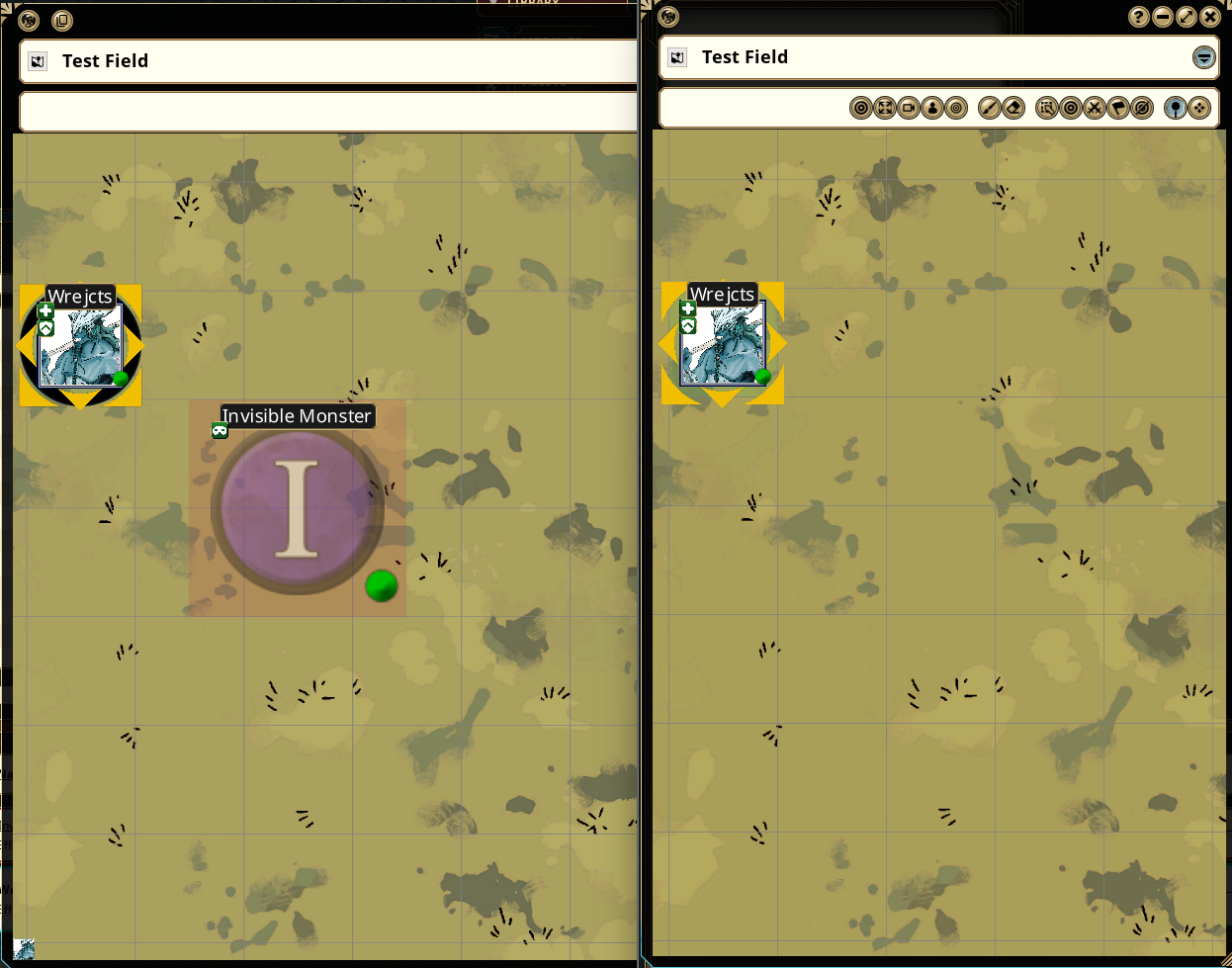
If a creature is invisible and a player character has no way to see it, that token can be hidden from that player. If the character has the proper senses, spells, items, or reveal effects, the token can remain visible to them.
Visibility Features
- Hides invisible creatures from players who cannot perceive them
- Supports See Invisibility, Truesight, Blindsight, and similar senses
- Supports reveal effects such as Faerie Fire, Branding Smite, Shining Smite, Starry Wisp, Revealed, and similar wording
- Supports Lantern of Revealing style effects
- Includes an Is In Darkness helper effect
- Uses distance and token height when checking special senses
- Works per viewer, allowing different players to see different things
- No custom statuses, tags, flags, prefixes, steps, hoops, jumps, leaps nor bounds. Just normal.. Fantasy Grounds effects.
For stricter per-character invisibility, shared party vision should be turned off.Last edited by Melborne; June 19th, 2026 at 01:55.
Weekly campaigns deserve better tools.
FGU extensions by Melborne
-
June 16th, 2026, 14:55 #7Zealot
- Join Date
- Sep 2018
- Location
- Canada
- Posts
- 81
NPC Combat Helpers
5E Table Tools includes several tools for running NPCs with more complex combat features. A standalone version can be found on the 5E Smart NPCs forge.
These are aimed at creatures with lair actions, legendary actions, legendary resistance, spell slots, innate casting, or other resources that are easy to forget during a busy combat. Adding actual NPC's to the combat tracker that contains the actions and lair actions of the original statblock for ease of use and quick access.
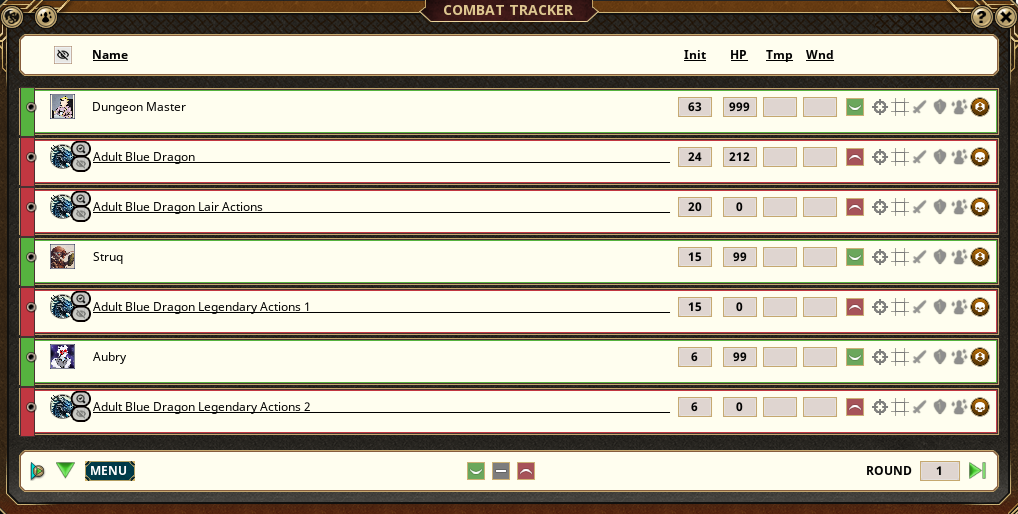
These Legendary Actions can be random from 1 to 3 per round, set between 1 and 3, or turned off completely. Each round they will change positions to match random characters intiatives, losing ties, all while displaying the actions available for that actor. They also match effects from their host, allowing Fantasy Grounds to continue to automate combat and deny actions if under conditions.
The Lair Actions are always set to Init 20; and if using 5E Group Initative extension by me, Melborne, it will roll with an average of 20 and the Group Initiative extension will populate the Lair action into its own private group and order itself properly with that in mind.
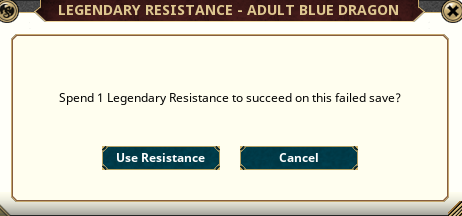
In the event that your NPC has Legendary Resistances, and has failed a save, a prompt will be given to the respected owner of the NPC asking if they would like to spend a legendary resistance. These resistances are counted down properly in the NPC Statblock as well as the Combat Tracker exactly where Fantasy Grounds places this information; the text changes and when you've reached 0/3 per day you won't be prompted anymore. The roll will be a faux 20 and show that you've decided to roll a nat 20 anyways.
Much like the Legendary Resistance tracking, Attacks and spells are also tracked.
Displaying a [USED] flag over attacks and spells, as well it will include a number to also count how many attacks you've done. In the legacy statblocks where spell slots are visible, they will automatically use the spell slots and once you've reached zero of course it will deny you the ability to cast with that slot. Upcast compatable. Innate spell casting, and 2024 rules, are still tracked in a simular way but reducing how many casts per day you have available to the NPC/statblock.
NPC Features
- Lair action helper actors
- Legendary action helper actors
- Configurable legendary action helper count
- Legendary resistance prompt support
- NPC spell slot tracking
- NPC innate casting tracking
- Back end turn tracking for combat resources
The goal is to keep important NPC resources visible and easier to run from the Combat Tracker.Last edited by Melborne; June 18th, 2026 at 02:32.
Weekly campaigns deserve better tools.
FGU extensions by Melborne
-
June 16th, 2026, 14:55 #8Zealot
- Join Date
- Sep 2018
- Location
- Canada
- Posts
- 81
Options and Setup
Most Table Tools features can be adjusted from the Fantasy Grounds Options window.
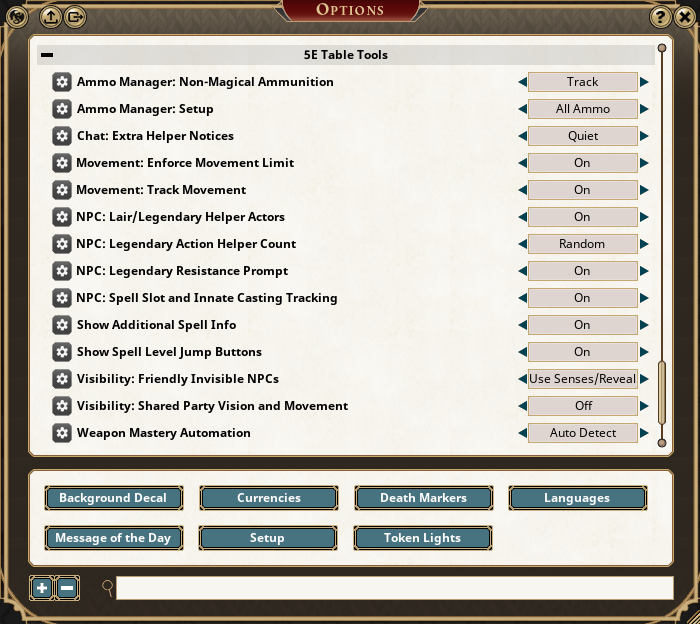
Options Include
- Ammo Manager setup
- Non-magical ammunition behavior
- Chat helper notice level
- Movement tracking
- Movement limit enforcement
- NPC lair and legendary helper actors
- Legendary resistance prompt behavior
- NPC spell slot and innate casting tracking
- Additional spell information
- Spell level jump buttons
- Weapon Mastery automation
Last edited by Melborne; June 17th, 2026 at 23:40.
Weekly campaigns deserve better tools.
FGU extensions by Melborne
-
June 16th, 2026, 14:56 #9Zealot
- Join Date
- Sep 2018
- Location
- Canada
- Posts
- 81
Reserved
Last edited by Melborne; Today at 01:15. Reason: Moved Changelog
Weekly campaigns deserve better tools.
FGU extensions by Melborne
-
June 17th, 2026, 05:05 #10Grand Templar
- Join Date
- Aug 2017
- Location
- Alabama USA
- Posts
- 299
That is a lot for one extension to try and accomplish on its own. I will try to get a chance to test it a bit later this week.


 Reply With Quote
Thread Information
Users Browsing this Thread
There are currently 2 users browsing this thread. (1 members and 1 guests)
 Posting Permissions

Bookmarks