

Thread: A slightly better drawing mode?
-
January 5th, 2014, 06:11 #1High Patriarch


- Join Date
- Oct 2010
- Location
- Provence, France
- Posts
- 631
A slightly better drawing mode?
Posted here since it has an image. I don't know the capability of the graphic framework used, but if it's simple I think the drawing mode could be improved without much work.
The current drawing is a pure black 1px pencil. Ugly. With something slightly bigger, slightly smoother, isn't it better? Like this:
Attachment 5790
Meaning each time a pixel is drawn, it's surrounded by 60% alpha (40% visible) pixels of the same.
If something like is simple to do, like 2 lines of code. If not, I guess we'll wait for the graphic framework getting vorpaled somewhere down the line Weekly Hurlements virtual tabletop rpg on TousRôlistes.fr
-
February 13th, 2014, 23:51 #2Grand Templar

- Join Date
- Jan 2009
- Location
- UK
- Posts
- 221
There is nothing I want more from Fantasy Grounds than an improved (completely revamped) drawing mode.
How do people handle a requirement for creating new maps on the fly when you need to improvise? The drawing capabilities are almost non-existent.
-
February 14th, 2014, 02:18 #3
when i need something in a hurry - https://pyromancers.com/dungeon-painter-online/ is such an awesome tool. if you spend 20mins working with it you can find ways to very quickly put together a basic map (less than 5mins).
otherwise I just put up with the line drawings...
-
February 14th, 2014, 07:47 #4Zealot
- Join Date
- Jan 2008
- Posts
- 81
I agree with Blacky and Surge !
The drawing mode could be easily improved in order to make maps on the fly.
I had to modify some aspects on maps during my play session yesterday and it's been horrible...
Maybe something to add on the wishlist !JDRVIRTUEL: Le JdR virtuel en français - https://www.jdrvirtuel.com
-
February 14th, 2014, 10:18 #5Moderators Immortal

Supreme Deity
- Join Date
- May 2011
- Location
- Colorado, USA
- Posts
- 34,765
I agree the drawing mode is pretty basic. Originally Posted by Surge

When I need to do maps on the fly I use the Image Layers extension with a blank image for the map and then I have a number of dungeon tile tokens that I can use to build up the map on the fly - put the mapping tiles on the base layer, features (doors, tables, statues, etc.) on the middle layer and then use the top layer for tokens as usual.
More information on the layers extension here: https://www.fantasygrounds.com/forum...-on-CoreRPG%29
Here is something I put together in literally 2 minutes, and you can expand this as the players explore by adding more tile tokens etc.:
The Original Creator (Dr Zeuss) gives a walk through of how to use the original extension he developed here: https://www.fantasygrounds.com/forum...l=1#post114668
You can get all sorts of tiles suitable for mapping - I got the D&D ones I use in the screenshot above from: https://rpgtableonline.com/market/store.php Some are free, some you need to purchase.
The dungeon tiles that come with community member Shockbolt's Fantasy Art Kit are great: https://www.rpgartkits.com/?page_id=401
Some dungeon tiles sets available free from here: https://rpgmapshare.com/index.php?q=...2_itemId=45482
And here: https://www.fantasticmaps.com/free-stuff/Last edited by Trenloe; February 23rd, 2018 at 19:47.
FG Wiki: How to Compile the FG Logs
Private Messages: My inbox is forever filling up with PMs. Please don't send me PMs unless they are actually private/personal messages. General FG questions should be asked in the forums - don't be afraid, the FG community don't bite and you're giving everyone the chance to respond and learn!
-
February 14th, 2014, 12:34 #6High Patriarch
- Join Date
- Oct 2010
- Location
- Provence, France
- Posts
- 631
Note that drawing isn't solely for mapping. It can be used on top of maps (since FG doesn't have a Text function), or to draw to explain something hard to describe, etc.
Weekly Hurlements virtual tabletop rpg on TousRôlistes.fr
-
February 14th, 2014, 14:44 #7Grand Templar
- Join Date
- Jan 2009
- Location
- UK
- Posts
- 221
That's amazing Trenloe. Thanks for all of these pointers and advice. Originally Posted by Trenloe
Do you have a separate Tokens folder for what are essentially dungeon tiles?
-
February 14th, 2014, 16:10 #8Moderators Immortal
Supreme Deity
- Join Date
- May 2011
- Location
- Colorado, USA
- Posts
- 34,765
Yep, I have a \tokens\host\tiles directory that then has folders for specific types of tiles: dungeon, wilderness, city... Originally Posted by Surge
Be careful having too many tokens (by too many, I'm talking about 100's) in the \tokens\host directory - these are all loaded when the GM starts FG and they all take up memory - and increase initial GM campaign loading time. If you go this route, it will be worth making token modules that you can open and close as needed.FG Wiki: How to Compile the FG Logs
Private Messages: My inbox is forever filling up with PMs. Please don't send me PMs unless they are actually private/personal messages. General FG questions should be asked in the forums - don't be afraid, the FG community don't bite and you're giving everyone the chance to respond and learn!
-
February 14th, 2014, 20:49 #9Immortal
Lesser Deity
- Join Date
- Mar 2006
- Location
- Arkansas
- Posts
- 7,261
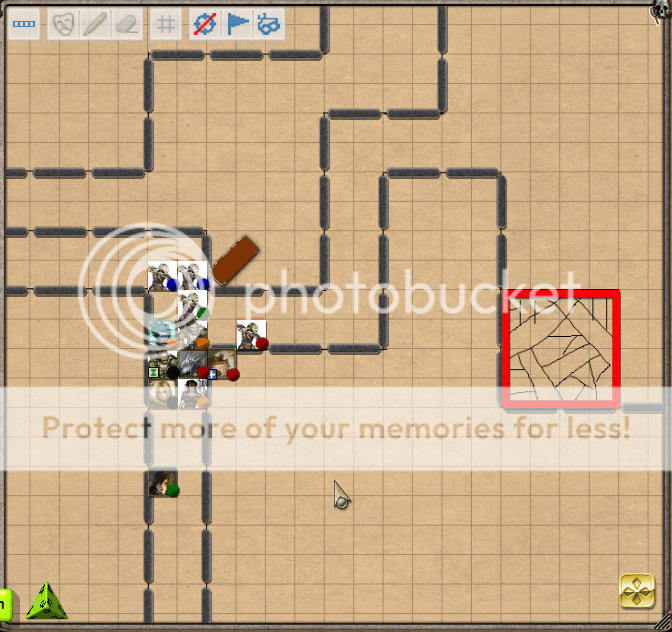
Just thought I'm mention a low tech solution is to use wall tokens to "draw" things on the fly as well. IE part of Undermoutain:
-
February 14th, 2014, 22:12 #10SmiteWorks
Supreme Deity
- Join Date
- Mar 2007
- Posts
- 23,504
I like it. It reminds me of old school graph paper.
Especially, if you make the players lay out the wall tokens.
JPG


 Reply With Quote


Thread Information
Users Browsing this Thread
There are currently 1 users browsing this thread. (0 members and 1 guests)
 Posting Permissions

Bookmarks